Toyota Yaris Cross Navigation With Google Maps in UK
The Toyota Yaris Cross offers an excellent Google Maps navigation experience for UK drivers. With wireless smartphone integration and live traffic updates, finding your way across Britain has never been easier. This guide covers setup, features, and pro tips to help you get the most from your Yaris Cross infotainment system. Whether you commute daily or explore the UK countryside, Google Maps keeps you on the right path.
The Toyota Yaris Cross is a stylish and compact SUV that has won hearts across the UK. One of the standout features for modern drivers is its Google Maps navigation capability. If you have just bought a Yaris Cross or are considering one, understanding how navigation works can make a huge difference in your daily drives. This guide walks you through everything you need to know about using Google Maps in your Toyota Yaris Cross while driving in the UK.
Google Maps has become the go-to navigation app for millions of drivers worldwide. It offers real-time traffic updates, route suggestions, and detailed map data that covers even the smallest UK streets. The Toyota Yaris Cross makes it easy to access all of this directly from your car’s infotainment screen. You get a smooth, responsive experience that feels natural and intuitive.
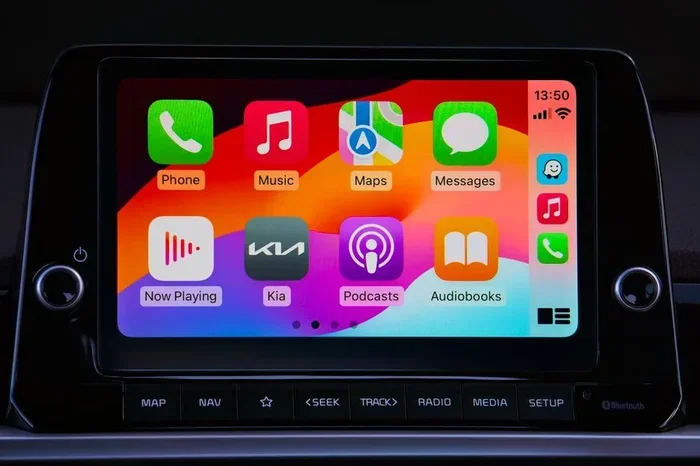
Setting up Google Maps on your Yaris Cross is straightforward. The system supports wireless smartphone integration, so you do not need messy cables. Once connected, your phone’s Google Maps mirrors onto the car’s display. You can search for destinations, plan routes, and receive live traffic alerts without taking your eyes off the road. This kind of connected navigation is exactly what modern UK drivers expect from a car like the Yaris Cross.
The Toyota Yaris Cross comes with a capable infotainment system that supports both Apple CarPlay and Android Auto. Through these systems, Google Maps becomes your primary navigation tool. The screen is bright and clear, making it easy to read directions even in direct sunlight. The system also supports voice commands, which means you can ask for directions without touching your phone.
Key Takeaways
- Easy Setup: Google Maps connects wirelessly to the Toyota Yaris Cross infotainment system in minutes.
- Live UK Traffic Updates: Real-time traffic data helps you avoid jams and save time on every journey.
- Voice Commands: Keep your hands on the wheel with hands-free navigation control.
- Offline Maps: Download maps for areas with poor signal, perfect for rural UK drives.
- Turn-by-Turn Directions: Google Maps provides clear, voice-guided directions across all UK roads.
- Seamless Integration: The system works smoothly with Apple CarPlay and Android Auto for a familiar experience.
📑 Table of Contents
- Why Google Maps Navigation Matters for Your Toyota Yaris Cross
- How to Set Up Google Maps on the Toyota Yaris Cross
- Features That Make Google Maps Great for UK Driving
- Toyota Yaris Cross Navigation vs. Built-in Sat Nav
- Tips for Getting the Most Out of Navigation in Your Yaris Cross
- Common Mistakes to Avoid with Google Maps Navigation
- Expert Insights on Toyota Yaris Cross Navigation
- Conclusion
Why Google Maps Navigation Matters for Your Toyota Yaris Cross
Navigation is no longer a luxury. It is a daily necessity for most UK drivers. Whether you commute to work, run errands, or take weekend trips, having reliable directions saves time and reduces stress. Google Maps stands out because it constantly updates its map data and traffic information.
For Toyota Yaris Cross owners, the combination of a well-designed infotainment system and Google Maps creates a powerful navigation setup. The app knows the UK road network inside out. It understands motorways, A-roads, B-roads, and even narrow country lanes. This level of detail makes Google Maps a trusted companion for every drive.
One major advantage of using Google Maps over a traditional built-in sat nav is the frequency of updates. Google continuously refreshes its map data, adding new roads, changing speed limits, and updating points of interest. Your built-in system may become outdated quickly, but Google Maps stays current. This is especially important in the UK, where new developments and road changes happen regularly.
Live Traffic Updates That Save You Time
One of the best features of Google Maps is its live traffic data. The app uses information from other drivers and sensors to show you current traffic conditions. If there is a jam on the M1 or delays on the M25, Google Maps will alert you and suggest an alternative route. This feature alone can save you minutes or even hours on your daily commute.
In the UK, traffic congestion is a real problem, especially in cities like London, Birmingham, and Manchester. Google Maps helps you navigate around these bottlenecks with ease. The Toyota Yaris Cross infotainment system displays traffic data clearly, using colour-coded routes. Green means clear, amber means slow, and red means heavy traffic. You can see this at a glance and decide whether to stick with your current route or reroute.
Voice Commands for Hands-Free Driving
Safety should always come first when driving. Google Maps on the Toyota Yaris Cross supports voice commands through both Apple CarPlay and Android Auto. You can say “Hey Google” or “OK Google” to search for destinations, change routes, or find nearby petrol stations. This hands-free approach keeps your eyes on the road and your hands on the wheel.
The voice recognition in Google Maps works impressively well, even with British accents. It understands natural language, so you do not need to speak in a robotic way. Simply say something like “Find a coffee shop near me” or “Take me to the nearest motorway” and the app will respond instantly. This makes navigation safer and more convenient for every Yaris Cross driver.
How to Set Up Google Maps on the Toyota Yaris Cross
Setting up Google Maps on your Toyota Yaris Cross is quick and easy. Follow these simple steps to get started:
- Connect your smartphone wirelessly to the Yaris Cross infotainment system via Apple CarPlay or Android Auto.
- Open Google Maps on your phone. It will automatically mirror onto the car screen.
- Allow location access so the app can track your position and provide accurate directions.
- Search for your destination using the search bar or voice command.
- Start navigation and follow the turn-by-turn directions displayed on screen.
Once you have completed the setup, Google Maps will remember your preferences. It will suggest frequently visited locations, show you the fastest routes, and alert you to speed cameras along the way. The Toyota Yaris Cross makes this process seamless, so you spend less time setting up and more time driving.
Wireless Connection Tips
To ensure a stable wireless connection between your phone and the Yaris Cross, keep these tips in mind. First, make sure your phone’s software is up to date. Second, restart both your phone and the car’s infotainment system if you experience connectivity issues. Third, keep your phone charged, as GPS usage can drain battery quickly. A wireless charging pad in the Yaris Cross can help keep your phone powered during long journeys.
Features That Make Google Maps Great for UK Driving
Google Maps is packed with features that make it ideal for driving in the UK. Let us look at some of the most useful ones for Yaris Cross owners.
Turn-by-Turn Directions
Google Maps provides clear, voice-guided turn-by-turn directions. It tells you when to turn, which lane to be in, and when to exit a motorway. The directions are spoken aloud through the car’s audio system, so you never have to glance at the screen. This is incredibly helpful when navigating complex UK roundabouts or multi-lane motorways.
Offline Maps for Rural Areas
Not all parts of the UK have strong mobile signal. Google Maps lets you download offline maps for specific regions. This is perfect for exploring the Scottish Highlands, the Lake District, or the Welsh countryside. You can navigate without internet access and still receive directions. Just download the maps over Wi-Fi before you set off on your adventure.
Points of Interest and Local Search
Google Maps is excellent at finding points of interest. Whether you need a petrol station, a restaurant, or a parking garage, the app shows you options nearby. It also displays ratings, opening hours, and contact details. For Yaris Cross drivers exploring new towns or cities, this feature is invaluable. You can discover local gems that you might otherwise miss.
Speed Camera and Speed Limit Alerts
Google Maps alerts you to fixed speed cameras and average speed zones across the UK. It also shows the speed limit for the road you are on. This helps you stay within the law and avoid expensive fines. The Yaris Cross infotainment screen displays these alerts clearly, so you always know what to expect ahead.
Toyota Yaris Cross Navigation vs. Built-in Sat Nav
Many cars come with a built-in satellite navigation system. So why use Google Maps on the Toyota Yaris Cross? Let us compare the two approaches.
| Feature | Google Maps | Built-in Sat Nav |
|---|---|---|
| Map Updates | Continuous, automatic | Periodic, often paid |
| Traffic Data | Real-time, live | Limited or none |
| Points of Interest | Extensive and current | Basic and outdated |
| Voice Commands | Advanced, natural language | Basic, limited commands |
| Offline Use | Supported | Usually not supported |
| Familiarity | Most drivers already use it | Different interface to learn |
| Cost | Free | Often requires extra payment |
As you can see, Google Maps has a clear advantage in most areas. The built-in sat nav in the Yaris Cross may work fine for basic directions, but it cannot match the depth and freshness of Google Maps data. For UK drivers who want the best navigation experience, Google Maps is the clear winner.
That said, some drivers prefer having a backup system. The Toyota Yaris Cross allows you to use both simultaneously. You can keep the built-in nav as a fallback while relying on Google Maps for your primary guidance. This dual approach gives you the best of both worlds.
Tips for Getting the Most Out of Navigation in Your Yaris Cross
To make the most of Google Maps in your Toyota Yaris Cross, consider these practical tips. They will help you navigate more efficiently and safely.
- Download offline maps before heading to areas with poor mobile signal. This prevents you from losing directions in remote parts of the UK.
- Set your home and work addresses in Google Maps. This allows quick one-tap navigation for your regular commute.
- Use the “Avoid tolls” or “Avoid motorways” options when planning routes. Google Maps lets you customise directions based on your preferences.
- Keep your phone mounted securely in the Yaris Cross. A good dashboard mount ensures the screen is visible without obstructing your view.
- Enable notifications for traffic alerts. Google Maps will proactively warn you about delays ahead, helping you choose the best route.
- Explore Street View before you go. If you are visiting a new location, Street View lets you familiarise yourself with the area before you arrive.
These small habits can make a big difference in your daily driving experience. The Toyota Yaris Cross provides a solid platform for Google Maps, and these tips help you unlock its full potential.
Quick Tips for UK Drivers
- Always check for roadworks on Google Maps before setting off. The app highlights planned roadworks across the UK.
- Use Google Maps to find EV charging stations near you. This is especially useful for Yaris Cross Hybrid owners.
- Set your preferred route type (fastest, shortest, or fuel-efficient) in the app settings before starting navigation.
Common Mistakes to Avoid with Google Maps Navigation
Even experienced drivers make mistakes with navigation. Here are some common errors to watch out for when using Google Maps in your Yaris Cross.
- Ignoring map updates. Even though Google Maps updates automatically, you should occasionally check that your app is current. Outdated app versions can cause glitches.
- Relying solely on GPS signal. In tunnels or dense urban areas, GPS can lose accuracy. Google Maps uses cellular data to compensate, but a poor signal can still cause issues.
- Not setting your destination before driving. Always input your destination while parked. Entering addresses while driving is distracting and unsafe.
- Forgetting to download offline maps. If you are heading to a remote area, do not rely on live data alone. Offline maps are your safety net.
- Ignoring voice prompts. Some drivers glance at the screen too often. Trust the voice directions and keep your eyes on the road.
Avoiding these mistakes will keep your navigation smooth and your drives safe. The Toyota Yaris Cross is designed to work harmoniously with Google Maps, but your habits play a big role too.
Expert Insights on Toyota Yaris Cross Navigation
According to automotive experts, the Toyota Yaris Cross is one of the best compact SUVs for tech-savvy drivers in the UK. Its support for wireless Apple CarPlay and Android Auto makes Google Maps integration seamless. The infotainment screen is responsive and bright, ensuring clear visibility in all lighting conditions.
Experts also highlight the importance of keeping your phone’s Google Maps app updated. New features and improvements are released regularly, and these can enhance your driving experience. For instance, Google recently added enhanced speed limit alerts and improved lane guidance, both of which benefit Yaris Cross drivers.
Another expert recommendation is to pair Google Maps with a good phone mount. The Yaris Cross has a dedicated phone tray area, but aftermarket mounts can offer even better viewing angles. A stable mount ensures your phone stays connected and the screen remains visible without blocking your view of the road.
It is also worth noting that the Yaris Cross interior is designed with driver comfort in mind. The infotainment screen sits at a natural eye level, reducing the need to look down. Combined with Google Maps clear visual display, this creates a navigation experience that is both functional and comfortable for long UK drives.
For those who frequently travel with passengers or need extra cargo space, the Yaris Cross remains a practical choice. Its versatile interior adapts to different needs, whether you are carrying groceries, sports equipment, or weekend luggage. To keep your car’s interior clean and protected, consider investing in title full coverage TPE floor mats designed for your vehicle. While these are marketed for the Highlander, similar TPE floor mat solutions are available for the Yaris Cross, offering excellent protection against dirt, spills, and wear.
Conclusion
The Toyota Yaris Cross with Google Maps navigation is a fantastic combination for UK drivers. The system is easy to set up, packed with useful features, and delivers reliable directions across the entire country. From live traffic updates to voice commands and offline maps, Google Maps covers all your navigation needs.
By following the tips in this guide, you can get the most out of your Yaris Cross navigation system. Avoid common mistakes, download offline maps for rural trips, and keep your app updated. The Toyota Yaris Cross is more than just a stylish compact SUV. It is a smart, connected driving companion that makes every journey smoother and more enjoyable.
Embrace the power of Google Maps in your Yaris Cross. Explore new places, avoid traffic, and drive with confidence knowing you always have the best directions at your fingertips. Happy driving across the UK!
Frequently Asked Questions
Can I use Google Maps offline in my Toyota Yaris Cross?
Yes, Google Maps supports offline maps. Simply download the map of your desired area over Wi-Fi before you travel. This is especially useful for rural parts of the UK where mobile signal may be weak. You will still receive turn-by-turn directions without an internet connection.
Does the Toyota Yaris Cross support wireless Apple CarPlay and Android Auto?
Yes, the Toyota Yaris Cross supports wireless Apple CarPlay and Android Auto. This allows you to connect your smartphone to the infotainment system without cables. Google Maps mirrors onto the car screen seamlessly through either platform.
How often does Google Maps update its map data for the UK?
Google Maps updates its map data continuously. New roads, changed speed limits, and updated points of interest are added regularly. You do not need to manually update the maps, as the app refreshes automatically when connected to the internet.
Can I use voice commands to control Google Maps while driving the Yaris Cross?
Absolutely. You can use voice commands by saying “Hey Google” or “OK Google” while driving. You can search for destinations, change routes, and find nearby places without touching your phone. This keeps your hands on the wheel and your eyes on the road.
Is Google Maps navigation free to use in the Toyota Yaris Cross?
Yes, Google Maps is completely free to download and use. All navigation features, including live traffic updates and turn-by-turn directions, are available at no cost. You only need a data connection or downloaded offline maps to get started.
What should I do if Google Maps loses signal while driving the Yaris Cross?
If Google Maps loses signal, it will try to reconnect automatically. If you have downloaded offline maps, you can continue navigating without any interruption. To minimise issues, download maps for your route beforehand when travelling through areas with poor coverage.