How to Reset Your Kia Infotainment System Quickly and Easily
A Kia infotainment system reset can fix frozen screens, unresponsive touchscreens, and software glitches fast. This guide walks you through both soft and hard reset methods for every Kia model. You will learn simple steps, expert tips, and common mistakes to avoid.
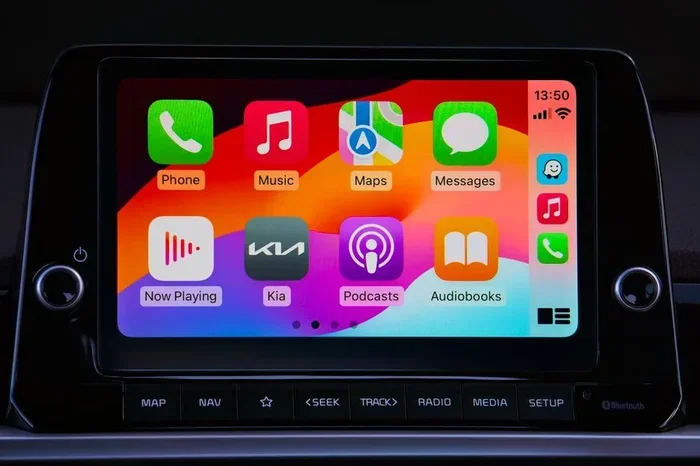
Your Kia infotainment system is the brain of your car’s tech experience. It controls your radio, navigation, Bluetooth, and even your rearview camera. But sometimes, it freezes. It lags. Or it just stops working out of nowhere. That is where a Kia infotainment system reset comes in handy.
A reset can bring your system back to life in just a few minutes. Whether you drive a Kia Sorento, Optima, Stinger, or Sportage, the process is simpler than you think. In this guide, we walk you through every method step by step. You will learn how to do a soft reset, a hard reset, and even a factory reset. We also share tips to keep your system running smooth for years to come.
No need to visit the dealer just yet. Most Kia infotainment issues can be fixed right in your driveway. Let us get your screen working again.
Key Takeaways
- A soft reset is the safest first step and takes under two minutes.
- A hard reset restores factory settings and fixes deeper software issues.
- Battery disconnect is a reliable method for a full Kia infotainment system reset.
- Knowing your Kia model helps you find the right reset steps quickly.
- Regular software updates can prevent many infotainment problems.
- Avoid common mistakes like holding buttons too long or resetting during updates.
- Seek professional help if resets do not solve the problem.
📑 Table of Contents
- Why You Might Need to Reset Your Kia Infotainment System
- How to Perform a Soft Reset on Your Kia Infotainment System
- How to Perform a Hard Reset (Factory Reset) on Your Kia Infotainment System
- Kia Infotainment System Reset by Model
- Tips to Keep Your Kia Infotainment System Running Smoothly
- Common Mistakes to Avoid When Resetting Your Kia Infotainment System
- When to Seek Professional Help
- Final Thoughts
Why You Might Need to Reset Your Kia Infotainment System
Car tech is great until it is not. Your Kia infotainment screen is no different from a phone or tablet. Sometimes it needs a fresh start. Here are the most common reasons you might need to reset your system.
Common Issues That Require a Reset
Before you jump into the reset process, it helps to know what is going wrong. Here are the top problems Kia owners face:
- Frozen or unresponsive touchscreen: You tap the screen, but nothing happens. The display stays stuck on one page.
- Black screen or blank display: You turn the key, but the screen stays dark. No lights, no menu, nothing.
- Bluetooth pairing failures: Your phone will not connect to the Kia media center, even after multiple tries.
- Navigation glitches: The map loads slowly, shows wrong locations, or crashes mid-route.
- Audio system errors: The radio cuts out, sounds distorted, or will not turn on.
- Slow performance: The system takes forever to load or respond to your inputs.
- Software bugs after updates: A recent Kia software update causes new problems instead of fixing old ones.
Any of these issues can make driving frustrating. A simple reset often solves them all. It clears temporary bugs and refreshes the system memory. Think of it like restarting your phone when it acts up.
How to Perform a Soft Reset on Your Kia Infotainment System
A soft reset is the easiest and safest method. It restarts the system without deleting any of your settings, saved addresses, or paired devices. This should always be your first step.
Soft Reset Method 1: The Restart Button
Many newer Kia models have a dedicated restart option built into the infotainment menu. Here is how to find it:
- Press and hold the power button on the infotainment screen.
- A menu will pop up on the display.
- Look for the option that says Restart or Reboot.
- Tap it and wait for the screen to turn off and back on.
- The full restart usually takes about 30 to 60 seconds.
This method works on most Kia models from 2019 and newer. If you do not see a restart option, try the next method below.
Soft Reset Method 2: Holding the Power Button
If your Kia does not have a restart menu, you can force a reboot the old-fashioned way:
- Locate the power button on the infotainment unit.
- Press and hold the button for about 10 to 15 seconds.
- The screen will go black and the system will shut down.
- Wait about 30 seconds.
- Press the power button again to turn it back on.
Quick Tip: Do not let go of the button too early. Hold it until the screen goes completely dark. This ensures the system fully powers down and resets properly.
Soft Reset Method 3: Turn the Car Off and On
The simplest soft reset of all? Just turn your car off and back on:
- Park the car and put it in Park.
- Turn the ignition off.
- Wait at least 60 seconds.
- Turn the ignition back on.
- The infotainment system will boot up fresh.
This method is not as thorough as the other two, but it works for minor glitches. It is a great first try before moving to more involved reset methods.
How to Perform a Hard Reset (Factory Reset) on Your Kia Infotainment System
A hard reset goes deeper than a soft reset. It wipes the system back to its original factory settings. This fixes serious software problems that a soft reset cannot touch. But it also erases all your personal settings, paired devices, and saved preferences.
Hard Reset via the Infotainment Settings Menu
Some Kia models let you factory reset directly from the settings menu. Here is how:
- Tap the Settings icon on your infotainment home screen.
- Scroll down to System or General Settings.
- Look for Factory Reset or Reset to Default.
- Confirm your choice when prompted.
- The system will restart and restore all settings to factory defaults.
This method works on Kia models with the latest UVO infotainment platform. If you do not see a factory reset option in settings, use the battery disconnect method below.
Hard Reset via Battery Disconnect
This is the most reliable way to perform a full Kia infotainment system reset. It cuts all power to the system and forces a complete reboot:
- Turn off the engine and remove the key from the ignition.
- Open the hood and locate the negative battery terminal.
- Use a wrench to loosen the cable on the negative terminal.
- Carefully pull the cable off the battery post.
- Wait at least 10 to 15 minutes.
- Reconnect the cable and tighten it securely.
- Start the car and let the infotainment system boot up.
Expert Insight: The battery disconnect method resets all electronic modules in your car, not just the infotainment system. This can clear hidden glitches throughout the vehicle. However, you may need to reconfigure your radio presets, clock, and Bluetooth pairings after reconnecting.
Comparison: Soft Reset vs. Hard Reset
Not sure which method to use? Here is a quick comparison to help you decide:
| Feature | Soft Reset | Hard Reset |
|---|---|---|
| Deletes settings? | No | Yes |
| Time required | 1-2 minutes | 10-15 minutes |
| Fixes frozen screen? | Yes (usually) | Yes (always) |
| Fixes deep software bugs? | Sometimes | Yes |
| Risk of data loss? | None | Low (erases personal data) |
| Difficulty level | Very easy | Moderate |
| Best for | Minor glitches | Persistent or serious issues |
Kia Infotainment System Reset by Model
Not all Kia models are the same. The reset process can vary depending on your year and model. Here are some model-specific tips to help you get it right the first time.
Kia Sorento and Optima Reset Steps
The Kia Sorento and Optima use the UVO3 infotainment system. To reset these models:
- Press and hold the volume knob for about 10 seconds.
- The screen will go dark and the system will reboot.
- Release the knob once the Kia logo appears.
- Wait for the system to fully restart.
This method also works for the Kia Forte and Kia Rio models from 2017 and newer.
Kia Stinger and Sportage Reset Steps
The Kia Stinger and Sportage come with a more advanced 12.3-inch dual display. For these models:
- Go to Settings on the main screen.
- Select System Management.
- Choose Reset and then Reset All.
- Confirm the reset when prompted.
If the touchscreen is completely unresponsive, use the battery disconnect method described above. It is the most reliable fallback for any Kia model.
Tips to Keep Your Kia Infotainment System Running Smoothly
Prevention is always better than cure. A few simple habits can keep your Kia infotainment system healthy and reduce the need for frequent resets.
Keep Your Software Updated
Kia releases infotainment software updates regularly. These updates fix bugs, improve performance, and add new features. To check for updates:
- Go to Settings on your infotainment screen.
- Look for Software Update or System Update.
- If an update is available, follow the on-screen prompts to install it.
- Never turn off the car during an update. This can corrupt the system.
Clear Cache and Temporary Files
Over time, your Kia media center accumulates temporary files. These can slow down the system. Clearing the cache can help:
- Go to Settings and find Storage or Device Care.
- Select Clear Cache or Delete Temporary Files.
- Restart the system after clearing.
Avoid Overloading the System
Your Kia infotainment system has limited memory. Loading too many apps, maps, or USB files can slow it down. Keep your media library organized and delete files you no longer need.
Common Mistakes to Avoid When Resetting Your Kia Infotainment System
Even simple resets can go wrong if you are not careful. Here are the most common mistakes Kia owners make:
- Resetting during a software update: Never interrupt an update. This can permanently damage the infotainment system.
- Holding buttons for too long: A quick press and hold is enough. Holding for 30 seconds or more can trigger unintended modes.
- Forgetting to save paired devices: A hard reset erases Bluetooth pairings. Make sure you know your pairing PIN before resetting.
- Not waiting long enough: After a battery disconnect, wait the full 10 to 15 minutes. Rushing the process can leave residual power in the system.
- Ignoring the owner’s manual: Your Kia manual has model-specific reset instructions. Always check it first.
Common Mistake: Many owners try to reset the system while the car is still running and driving. Always reset your Kia infotainment system when the car is parked and the engine is off. Safety first.
When to Seek Professional Help
Most Kia infotainment problems resolve with a simple reset. But sometimes, the issue runs deeper. Here are signs that you need professional help:
- The screen stays black even after a full battery disconnect reset.
- The system keeps freezing repeatedly, no matter how many times you reset.
- You notice a burning smell or see flickering lights near the infotainment unit.
- The system will not respond to any button presses or touch inputs at all.
- Error messages keep appearing even after a factory reset.
In these cases, the problem may be a hardware failure or a deep software corruption. A certified Kia dealer or qualified auto electronics technician can diagnose the issue properly. They have access to Kia diagnostic tools that can read error codes and identify the root cause.
Do not try to open the infotainment unit yourself. This can void your warranty and cause further damage. Always let a professional handle complex repairs.
Final Thoughts
A Kia infotainment system reset is one of the simplest and most effective fixes you can do at home. Whether you choose a soft reset or a hard reset, the process is quick and does not require any special tools. Most Kia owners can resolve common screen freezes, audio glitches, and Bluetooth issues in under 10 minutes.
Start with a soft reset. If that does not work, move to a hard reset. And always remember to back up your paired devices and settings before doing a factory reset. Keep your software updated and your system clean to avoid future problems.
With the steps in this guide, you have everything you need to tackle any Kia infotainment issue. You do not need to be a tech expert. You just need a little patience and the right approach. Your Kia’s tech system will thank you for it.
Frequently Asked Questions
How long does a Kia infotainment system reset take?
A soft reset takes about 1 to 2 minutes. A hard reset or factory reset can take 10 to 15 minutes, including the wait time after a battery disconnect. The actual reboot process is fast, but you should give the system a minute or two to fully initialize after it turns back on.
Will resetting my Kia infotainment system delete my saved navigation addresses?
Yes, a hard reset or factory reset will erase all saved navigation addresses, paired Bluetooth devices, radio presets, and personal settings. A soft reset does not delete any of these. Always note down important information before performing a hard reset on your Kia media center.
Can I reset my Kia infotainment system while driving?
No, you should never reset the system while driving. Always park the car, turn off the engine, and engage the parking brake before attempting any reset. A frozen screen during a reset can distract you, which is dangerous on the road.
How often should I reset my Kia infotainment system?
You should not need to reset your Kia infotainment system regularly. A reset is only needed when you experience glitches, freezes, or performance issues. If you find yourself resetting often, it may be a sign of a deeper problem that needs professional diagnosis.
What is the difference between a soft reset and a factory reset on Kia UVO?
A soft reset simply restarts the system without changing any settings or data. A factory reset wipes the system clean and restores it to the original out-of-box configuration. The factory reset is much more thorough and should only be used when a soft reset fails to fix the problem.
Does a Kia infotainment system reset fix Bluetooth connectivity issues?
Yes, in most cases a Kia infotainment system reset resolves Bluetooth pairing problems. The reset clears temporary connection errors and refreshes the system’s wireless modules. After the reset, try pairing your phone again for the best results.
=== CONCLUSION ===
A Kia infotainment system reset is a powerful tool every Kia owner should know how to use. It saves time, money, and the hassle of visiting a dealer for minor tech issues. With the soft reset, hard reset, and model-specific tips in this guide, you are fully equipped to handle almost any infotainment problem on your own. Keep your system updated, avoid common mistakes, and reach out to a professional when needed. Your Kia’s technology should work for you, not against you.