SD Card Navigation for Mercedes Owners Complete Guide
SD card navigation Mercedes systems let you update maps, plan routes, and navigate with confidence using a simple memory card. This guide covers everything from how the system works to updating maps, fixing common issues, and getting the best performance from your Mercedes Benz GPS. Whether you drive a new or older model, you will find practical steps to keep your navigation running smoothly.
If you own a Mercedes Benz, you already know the value of a smooth, reliable driving experience. One of the best ways to keep your car feeling current is by maintaining your sd card navigation Mercedes system. Whether your car came with a built-in GPS or you added one later, the navigation SD card Mercedes plays a big role in how well your system works.
Many owners forget about their navigation system until something goes wrong. Roads change. New streets get built. Businesses close or open. Without regular map update Mercedes efforts, your GPS can send you in the wrong direction. This guide walks you through everything you need to know about sd card navigation Mercedes setups, from understanding how they work to keeping your maps fresh and accurate.
You do not need to be a tech expert to get the most out of your Mercedes GPS navigation. With a few simple steps and a little regular attention, you can keep your system running like new. Let us dive in.
Key Takeaways
- Easy Map Updates: You can keep your Mercedes navigation system current by simply swapping in a fresh SD card with updated map data.
- Offline Reliability: Unlike online systems, SD card navigation Mercedes works without a live internet connection, making it dependable in remote areas.
- Wide Model Compatibility: Most Mercedes models from the mid-2000s onward support navigation disc Mercedes or SD card-based systems.
- Simple Troubleshooting: Common issues like unrecognized cards or outdated maps have straightforward fixes you can do at home.
- Better Route Planning: Updated map data gives you access to the latest roads, points of interest, and live traffic Mercedes features where supported.
- Affordable Upgrades: Buying a new navigation SD card Mercedes is often cheaper than upgrading to a newer infotainment unit.
📑 Table of Contents
- What Is SD Card Navigation for Mercedes?
- How SD Card Navigation Works in Mercedes Vehicles
- How to Update Maps Using an SD Card
- Benefits of SD Card Navigation in Mercedes
- Common Problems and How to Fix Them
- Tips to Get the Most from Your SD Card Navigation
- Expert Insights on SD Card Navigation
- Key Takeaways
- Frequently Asked Questions
- Conclusion
What Is SD Card Navigation for Mercedes?
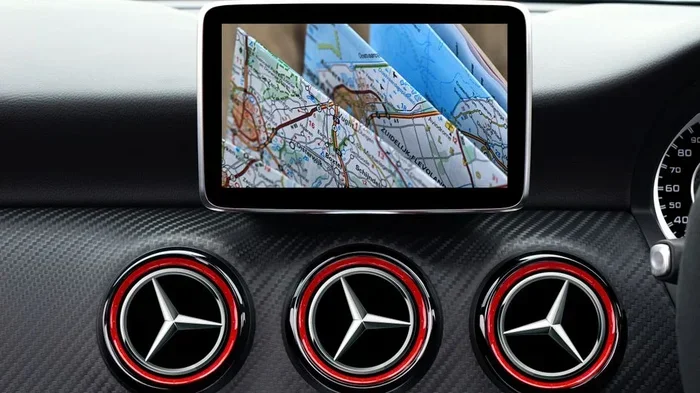
A sd card navigation Mercedes system uses a removable memory card to store map data, route information, and points of interest. Instead of relying on a built-in hard drive or an internet connection, the system reads navigation data directly from the card. This design has been a staple of Mercedes navigation systems for many years and remains a trusted method for in-car guidance.
The card slots into a dedicated reader inside the car, usually near the center console or in the glove box. Once inserted, the Mercedes navigation system loads the map data and gives you full access to turn-by-turn directions, voice prompts, and route suggestions. Think of it as a self-contained GPS unit that lives inside your car.
Older Mercedes models often used a navigation disc Mercedes format, where map data lived on a CD or DVD. Over time, Mercedes moved to SD cards because they are smaller, more durable, and easier to swap out. Today, sd card navigation Mercedes remains one of the most common ways to keep your car’s GPS up to date.
How SD Card Navigation Works in Mercedes Vehicles
Understanding the SD Card Slot
The SD card slot Mercedes is typically located in one of a few spots depending on your model. In many newer vehicles, you will find it in the center console storage area. In older models, the slot may sit behind the glove compartment or near the radio unit. Consult your owner’s manual if you are unsure where yours is located.
The card itself is usually a standard SD or mini-SD format. Mercedes has used different card sizes over the years, so it is worth checking your specific model’s requirements before purchasing a replacement. Most Mercedes map update cards come pre-loaded with the correct format and file structure, which makes installation simple.
Once you insert the card, the system recognizes it automatically. You may see a message on the display asking if you want to load the new data. Simply confirm, and the Mercedes GPS navigation system will update its internal maps within a few minutes.
Compatible Mercedes Models
Not every Mercedes uses the same sd card navigation Mercedes setup. Here is a general breakdown of which models and years are compatible:
- W203 (C-Class, 2000-2007): Often used navigation disc Mercedes systems, but later models supported SD cards.
- W204 (C-Class, 2007-2014): Most versions include SD card-based Mercedes navigation system support.
- W212 (E-Class, 2009-2016): Equipped with Mercedes multimedia navigation that reads SD cards for map data.
- W221 (S-Class, 2005-2013): Higher-end trim levels included SD card navigation with advanced route planning.
- W246 (B-Class, 2011-2018): Used SD card-based Mercedes GPS navigation in most markets.
- R172 (SLK, 2004-2016): Sport models often featured SD card navigation as an option.
If you are unsure whether your specific model supports an sd card navigation Mercedes setup, check your infotainment system for a “Map Update” or “Navigation Media” option in the settings menu. If you see it, your car is compatible.
How to Update Maps Using an SD Card
Step-by-Step Map Update Process
Updating your maps is one of the most important maintenance tasks for any sd card navigation Mercedes system. Follow these steps to keep your data current:
- Check your current map version. Go to the navigation settings on your display and look for the map version number. Write it down or take a photo.
- Visit the official Mercedes website. Go to the Mercedes-Benz map update portal and enter your vehicle identification number or select your model and year.
- Purchase or download the latest map data. Depending on your region, you may be able to download the update file directly or order a physical SD card with the new maps pre-loaded.
- Transfer the file to the SD card (if needed). If you downloaded a file, copy it to a formatted SD card using your computer. Make sure the card is empty and properly formatted as FAT32.
- Insert the SD card into your car. Power on the vehicle and insert the card into the SD card slot Mercedes reader.
- Follow the on-screen prompts. The system will detect the new data and guide you through the installation process. Do not remove the card while the update is in progress.
- Verify the update. Once complete, check the map version in your settings to confirm the new data is active.
This process usually takes between 15 and 45 minutes depending on the size of the update. Mercedes map update files can be large, especially when they include full Europe or North America data sets.
Where to Get Updated Maps
There are a few reliable sources for sd card navigation Mercedes map updates:
- Mercedes-Benz Dealership: The most reliable source. A dealer can order the correct map disc or SD card for your exact model and year.
- Official Mercedes Online Store: Mercedes offers digital map updates on their website, which you can download and transfer to your own SD card.
- Authorized Online Retailers: Several reputable online stores sell pre-formatted navigation SD card Mercedes options with the latest map data.
- Third-Party Map Providers: Some companies specialize in Mercedes map update solutions and offer more frequent updates than the official Mercedes schedule.
Always make sure any map data Mercedes you purchase is compatible with your specific COMAND or navigation system version. Using the wrong file format can cause errors or even damage the system software.
Benefits of SD Card Navigation in Mercedes
Offline Navigation Advantage
One of the biggest advantages of sd card navigation Mercedes is that it works entirely offline. You do not need a cellular signal or an active data connection to get directions. This makes Mercedes GPS navigation incredibly reliable in rural areas, tunnels, and regions with poor cell coverage.
While newer Mercedes models with connected services offer live traffic Mercedes updates over the internet, the SD card system still provides solid base navigation without any subscription fees. You get reliable routing, voice guidance, and lane assistance without paying a monthly service charge.
Route Planning Features
A good sd card navigation Mercedes system does more than just tell you to turn left in 200 meters. Modern Mercedes navigation system software offers:
- Multiple route options: Fastest, shortest, and scenic routes based on current map data.
- Points of interest search: Find gas stations, restaurants, hotels, and attractions along your route.
- Address book integration: Save frequent destinations and access them with a single tap.
- Speed limit alerts: Get notified of upcoming speed limits based on your map data Mercedes files.
- Favorites and recent destinations: Quick access to places you visit often.
These features make sd card navigation Mercedes a powerful tool for both daily commutes and long road trips. When your maps are current, you can trust the system to find the best routes and avoid roads that have changed since your last update.
Common Problems and How to Fix Them
SD Card Not Recognized
If your car’s display does not recognize the navigation SD card Mercedes, do not panic. This is one of the most common issues owners face, and it usually has a simple fix. Try these steps in order:
- Remove the card and check it for dust or debris. Wipe it gently with a soft, dry cloth.
- Try reinserting the card firmly. Make sure it clicks into place.
- Test the card in another device to confirm it is not damaged.
- Check the SD card slot Mercedes reader for any visible damage or obstruction.
- If the card still is not recognized, try a different SD card with the same map files.
Sometimes the issue is not the card itself but a temporary software glitch. Restarting the infotainment system by holding the power button for 10 seconds often resolves the problem.
Outdated Map Data Issues
Outdated map data Mercedes can cause a range of navigation problems. You might get redirected onto roads that no longer exist, miss new highway interchanges, or struggle to find recently opened businesses. If your Mercedes map update is more than two years old, it is time for a refresh.
Regular updates keep your Mercedes navigation system accurate and reliable. Most Mercedes owners should update their maps at least once a year, especially if they travel to new areas frequently.
Tips to Get the Most from Your SD Card Navigation
Keeping Your Maps Current
The single best thing you can do for your sd card navigation Mercedes is to keep the map data current. Set a reminder on your calendar to check for updates every six to twelve months. New roads, changed speed limits, and updated points of interest make a big difference in navigation accuracy.
Also, consider purchasing a second SD card so you always have a backup. If your primary card becomes corrupted or damaged, you will not be stuck without navigation.
Organizing Your SD Card Properly
Take care of your navigation SD card Mercedes the same way you would take care of any important tool. Store it in a protective case when not in use. Keep it away from extreme heat, moisture, and magnetic fields. Avoid touching the gold contacts with your fingers, as oils from your skin can cause connection problems over time.
Label your cards clearly so you always know which one has the latest maps. A small investment in card organization saves a lot of frustration down the road.
Expert Insights on SD Card Navigation
According to automotive technology experts, sd card navigation Mercedes systems offer a great balance of reliability and simplicity. Unlike more complex connected infotainment systems that depend on software updates over the air, the SD card approach gives you full control over your map data. You decide when and how often to update, and you own the data outright.
Experts also recommend keeping your Mercedes multimedia navigation firmware up to date alongside your maps. Firmware updates can improve system speed, add new features, and fix bugs that affect navigation performance. Check with your Mercedes dealer or visit the official Mercedes website for the latest firmware downloads.
Key Takeaways
- Easy Map Updates: You can keep your Mercedes navigation system current by simply swapping in a fresh SD card with updated map data.
- Offline Reliability: Unlike online systems, SD card navigation Mercedes works without a live internet connection, making it dependable in remote areas.
- Wide Model Compatibility: Most Mercedes models from the mid-2000s onward support navigation disc Mercedes or SD card-based systems.
- Simple Troubleshooting: Common issues like unrecognized cards or outdated maps have straightforward fixes you can do at home.
- Better Route Planning: Updated map data gives you access to the latest roads, points of interest, and live traffic Mercedes features where supported.
- Affordable Upgrades: Buying a new navigation SD card Mercedes is often cheaper than upgrading to a newer infotainment unit.
Frequently Asked Questions
How often should I update the maps on my Mercedes SD card?
You should update your sd card navigation Mercedes maps at least once a year. If you travel frequently or live in an area with lots of new road construction, consider updating every six months. Fresh map data Mercedes ensures your routes are accurate and your Mercedes GPS navigation system works reliably.
Can I use any SD card for my Mercedes navigation system?
Not all SD cards are compatible. Mercedes navigation systems Mercedes typically require cards in specific formats, usually SD or mini-SD with a FAT32 file system. Check your owner’s manual or contact a Mercedes dealer to confirm the correct card type for your model before purchasing.
Is sd card navigation Mercedes better than built-in online navigation?
Both systems have their strengths. SD card navigation Mercedes works offline, requires no subscription, and gives you full control over your data. Online navigation offers real-time live traffic Mercedes updates and automatic map downloads. Many owners prefer SD cards for their simplicity and reliability, especially in areas with poor cell coverage.
Where can I buy updated maps for my Mercedes navigation SD card?
You can purchase updated maps from the official Mercedes-Benz website, your local Mercedes dealer, or authorized online retailers. Make sure the navigation SD card Mercedes you buy matches your specific model and navigation system version to avoid compatibility issues.
What should I do if my Mercedes navigation system freezes after inserting a new SD card?
First, try restarting the infotainment system by holding the power button for about 10 seconds. If the problem continues, remove the card and check that it is properly formatted. Sometimes the Mercedes map update file may be incompatible with your system version. Contact a Mercedes dealer for assistance if the issue persists.
Can I transfer my old map data to a new SD card?
Yes, you can copy your existing map data Mercedes to a new card using a computer. Just make sure the new card is properly formatted as FAT32 and has enough storage capacity. However, it is usually better to purchase a fresh Mercedes navigation system card with the latest maps pre-installed for the best accuracy and performance.
Conclusion
Taking care of your sd card navigation Mercedes system is one of the simplest and most rewarding things you can do as a car owner. With regular map update Mercedes efforts, proper card storage, and a basic understanding of how the system works, you can enjoy accurate, reliable navigation for years to come. Your Mercedes GPS navigation system is a powerful tool, but only when it has the right data to work with.
Whether you are planning a daily commute or a cross-country road trip, a current navigation SD card Mercedes gives you the confidence to go anywhere. Follow the tips in this guide, keep your maps fresh, and your Mercedes navigation system will continue to serve you well on every journey ahead.