When Will Tesla Integrate With Waze and Why It Matters
Tesla drivers have been asking when will Tesla integrate with Waze for years. Waze offers real-time traffic data and community alerts that Tesla’s built-in navigation currently lacks. While no official announcement has been made, rumors and workarounds suggest this integration could be closer than you think. This article covers everything you need to know about the potential Tesla Waze integration, why it matters, and what you can do right now.
Tesla owners love their cars. The sleek design, the Autopilot features, and the over-the-air updates make driving feel futuristic. But there is one thing that bugs many drivers: the built-in navigation system. Tesla Maps works fine for most trips. However, it does not offer the same level of real-time traffic data that apps like Waze provide. This has led to a common question: when will Tesla integrate with Waze?
The short answer is that no official announcement has been made yet. But the topic is gaining traction among Tesla fans and tech enthusiasts. Waze is known for its community-driven alerts, live traffic updates, and smart rerouting. These features can make daily commutes and road trips much smoother. Many Tesla drivers want this experience built right into their car’s infotainment system. In this article, we will explore the current state of Tesla Waze integration, why it matters, and what you can do in the meantime.
Key Takeaways
- No official integration yet: Tesla has not announced a native Waze integration as of 2024.
- Workarounds exist: You can use Apple CarPlay or Android Auto to access Waze on Tesla vehicles today.
- Waze offers unique features: Community-driven alerts, real-time traffic updates, and shortcut suggestions set Waze apart from Tesla Maps.
- Rumors suggest future plans: Tesla may be exploring partnerships or adding Waze to its app ecosystem.
- Why it matters: Better navigation means safer, faster, and more efficient driving for Tesla owners.
- Stay updated: Tesla frequently rolls out software updates, so the integration timeline could change.
📑 Table of Contents
- What Is Waze and Why Do Tesla Drivers Want It?
- The Current State of Tesla Navigation
- Workarounds: How to Use Waze on Tesla Today
- Why Tesla Has Not Integrated Waze Yet
- When Will Tesla Integrate With Waze? Predictions and Rumors
- What a Tesla Waze Integration Would Look Like
- What You Can Do Right Now
- Conclusion
What Is Waze and Why Do Tesla Drivers Want It?
Waze is a GPS navigation app owned by Google. It relies on millions of users to share real-time traffic updates, accident reports, and road hazard alerts. This community-driven approach makes Waze one of the most accurate navigation tools available. Tesla drivers want Waze because their current built-in Tesla navigation system does not offer the same level of detail and live updates.
Here are some reasons Tesla owners are eager for Waze for Tesla:
- Real-time traffic data: Waze constantly updates routes based on current traffic conditions.
- Community alerts: Users report accidents, police presence, road closures, and more in real time.
- Smart rerouting: Waze automatically finds shortcuts to save time during your drive.
- Gas and EV charging station info: Waze shows nearby fuel stops and charging points.
- Voice commands: Waze supports hands-free navigation, which pairs well with Tesla’s voice command system.
Tesla’s built-in Tesla Maps has improved over the years. It offers route planning, charging station locations, and basic traffic data. But it still falls short in areas where Waze excels. For daily commuters and long-distance road trippers alike, the difference is noticeable. This gap in functionality is exactly why drivers are asking when will Tesla integrate with Waze.
The Current State of Tesla Navigation
Before we dive into the future, let us look at where Tesla stands today. Tesla vehicles come with a built-in navigation system powered by Tesla Maps. This system uses data from various sources to provide turn-by-turn directions. It also displays Supercharger locations along your route, which is a huge plus for Tesla owners.
What Tesla Maps Does Well
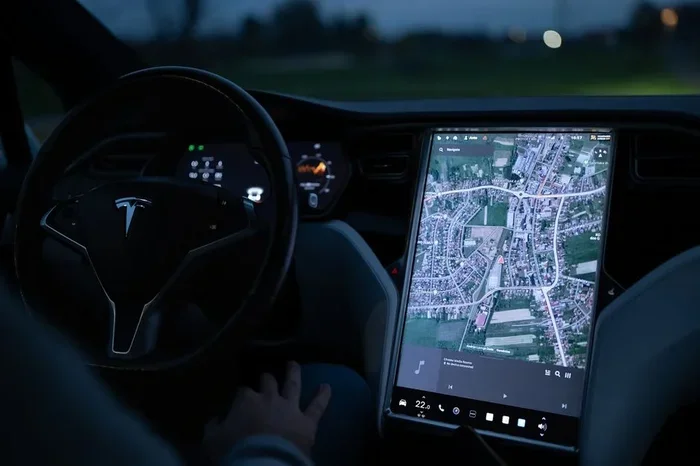
Tesla Maps has several strengths. It integrates seamlessly with the car’s systems. You can plan routes that include charging stops automatically. The interface is clean and easy to use on the central touchscreen. It also works well with Tesla’s Autopilot and Full Self-Driving features for a more hands-free experience.
Where Tesla Maps Falls Short
Despite its strengths, Tesla Maps has clear limitations compared to apps like Waze:
- Less real-time traffic accuracy: Tesla Maps does not update as frequently as Waze.
- No community alerts: You will not get warnings about accidents, hazards, or police on the road.
- Fewer shortcut options: Tesla Maps tends to stick to main highways rather than exploring side roads.
- Limited third-party app support: Tesla does not natively support many popular navigation apps like Waze.
These limitations are the main reason the Tesla Waze integration conversation keeps coming up. Drivers want the best of both worlds: Tesla’s hardware and Waze’s smart navigation data.
Workarounds: How to Use Waze on Tesla Today
Even though a native Tesla Waze integration does not exist yet, there are ways to use Waze on your Tesla right now. These workarounds are not perfect, but they get the job done.
Option 1: Apple CarPlay
Some newer Tesla models support Apple CarPlay through a USB connection. CarPlay allows you to mirror your iPhone’s screen on the Tesla display. This means you can open Waze on your phone and view it on the car’s touchscreen. You get all the Waze features, including live traffic updates and community alerts.
However, CarPlay on Tesla is not officially supported. It often requires a third-party adapter or software modification. The experience can be a bit clunky compared to a native integration. Still, it is one of the best options available today for drivers who want Waze for Tesla without waiting.
Option 2: Android Auto
Android users can take a similar approach. Some Tesla models allow Android Auto through a USB connection. Once connected, you can access Waze on the car’s display. Just like with CarPlay, this is not a native solution. It works, but it may not feel as seamless as a built-in feature.
Option 3: Mirror Your Phone Screen
Another option is to simply mount your phone on the dashboard and use Waze directly from your device. This is the simplest method. It does not require any extra hardware or software. The downside is that it can be distracting and may not look as polished as a fully integrated system.
These workarounds show that Tesla owners are resourceful. But they also highlight why a native Tesla Waze integration would be a game-changer. A built-in solution would be safer, smoother, and more convenient for everyone.
Why Tesla Has Not Integrated Waze Yet
You might wonder why Tesla has not simply added Waze to its system already. There are several reasons behind this decision. Understanding these factors helps explain the delay and gives insight into what the future might hold.
Tesla’s Focus on Its Own Navigation
Tesla has invested heavily in its own Tesla navigation system. The company wants to control the entire user experience. By building its own navigation, Tesla can tightly integrate it with Autopilot, route planning, and Supercharger locations. Adding a third-party app like Waze could complicate this vision.
Business and Partnership Considerations
Waze is owned by Google, a direct competitor to Tesla in the self-driving space. Google has its own navigation app, Google Maps, which is already available on many platforms. A partnership between Tesla and Waze could raise questions about competition and data sharing. These business dynamics likely play a role in the delay.
Technical Challenges
Integrating Waze into Tesla’s infotainment system is not simple. The Tesla software runs on a custom operating system. Adding support for a third-party app requires significant development effort. Tesla would need to ensure that Waze works smoothly with the car’s hardware, voice commands, and safety features. This takes time and resources.
Regulatory and Safety Concerns
Tesla takes safety very seriously. Adding new apps to the vehicle’s display involves rigorous testing. The company must ensure that any navigation app does not distract the driver or interfere with Autopilot functions. This careful approach is admirable but also slows down the process.
When Will Tesla Integrate With Waze? Predictions and Rumors
The big question remains: when will Tesla integrate with Waze? While there is no official timeline, several clues suggest that this integration could be on the horizon.
Rumors and Leaks
Over the past year, there have been whispers about Tesla exploring partnerships with navigation apps. Some insiders suggest that Tesla is testing Waze for Tesla compatibility in beta software builds. These rumors have not been confirmed, but they have fueled hope among Tesla owners.
Tesla’s History of Listening to Customers
Tesla is known for responding to customer feedback. The company regularly updates its software based on user requests. If enough drivers ask for Waze integration, Tesla may prioritize it in a future update. The company’s commitment to continuous improvement works in favor of this possibility.
Potential Timeline
While no one can say for sure, many experts believe that a Tesla Waze integration could happen within the next one to two years. Tesla releases major software updates several times a year. If the company decides to move forward, it could be rolled out relatively quickly through an over-the-air update. Keep an eye on Tesla’s official blog and social media channels for announcements.
What a Tesla Waze Integration Would Look Like
If Tesla does decide to integrate Waze, what would the experience look like? Here are some possibilities based on how similar integrations work in other vehicles.
- Native app on the infotainment screen: Waze would appear as a standalone app on the Tesla display, just like Tesla Maps.
- Voice command support: You could say “Navigate with Waze” and the app would launch with your destination.
- Seamless route sharing: Waze routes could sync with Tesla’s trip planning, including Supercharger stops.
- Live traffic overlays: The Tesla screen would display Waze’s real-time traffic data and community alerts.
- Minimal distraction: The integration would follow Tesla’s safety guidelines, keeping the driver’s focus on the road.
A well-executed Tesla Waze integration would combine the best of both worlds. You would get Tesla’s powerful hardware and Waze’s intelligent navigation data. The result would be a smoother, safer, and more efficient driving experience.
What You Can Do Right Now
Waiting for an official Tesla Waze integration can be frustrating. But there are steps you can take today to improve your navigation experience in your Tesla.
Use Apple CarPlay or Android Auto
If your Tesla supports it, connect your phone via CarPlay or Android Auto. This gives you access to Waze on the car’s display. It is not perfect, but it bridges the gap for now.
Provide Feedback to Tesla
Tesla listens to its customers. Use the in-car feedback tool or visit Tesla’s official forums to request Waze integration. The more drivers speak up, the more likely Tesla is to take action.
Stay Informed
Follow Tesla news outlets, Reddit communities, and official Tesla channels. When when will Tesla integrate with Waze finally has an answer, you will be among the first to know.
Explore Alternative Navigation Apps
While you wait, consider using other navigation apps that work with Tesla. Some drivers use Google Maps through CarPlay or third-party apps available on Tesla’s browser. These alternatives can help fill the gap until a native Waze integration arrives.
Conclusion
The desire for a Tesla Waze integration is clear. Tesla drivers want better navigation, real-time traffic updates, and community-driven alerts. While Tesla has not yet announced a native Waze integration, the signs are promising. Workarounds exist, rumors are circulating, and customer demand is growing. The question is not really if Tesla will integrate with Waze, but when. Keep your Tesla software updated, share your feedback, and stay tuned for what could be a major improvement to the driving experience.
A better navigation experience means safer roads, shorter commutes, and less stress behind the wheel. Whether Tesla partners with Waze or develops its own enhanced navigation, the future looks bright for Tesla owners who want smarter driving tools.
Frequently Asked Questions
Can I use Waze on my Tesla right now?
Not natively, but you can use Waze through Apple CarPlay or Android Auto if your Tesla model supports it. You can also use Waze on your phone mounted on the dashboard. These workarounds are not as seamless as a native integration, but they work well in a pinch.
Why does Tesla not have Waze built in yet?
Tesla focuses on its own navigation system and infotainment ecosystem. Business considerations, technical challenges, and safety testing all play a role in the delay. Tesla also wants to maintain full control over the user experience inside the vehicle.
Is there an official Tesla Waze integration announcement?
As of now, there is no official announcement from Tesla about integrating Waze. However, rumors and beta software leaks suggest that Tesla may be exploring this possibility. Keep an eye on Tesla’s official channels for updates.
Will a Waze integration replace Tesla Maps?
It is unlikely that Waze would replace Tesla Maps entirely. Tesla Maps offers unique features like Supercharger route planning and Autopilot integration. A Waze integration would likely work alongside Tesla Maps, giving drivers more options.
How would Waze integration benefit Tesla drivers?
A Waze integration would provide real-time traffic updates, community alerts about accidents or hazards, and smart rerouting. These features can save time, reduce stress, and make daily commutes and road trips more efficient for Tesla owners.
When could we expect Tesla to integrate with Waze?
While no official timeline exists, many experts predict that a Tesla Waze integration could happen within the next one to two years. Tesla frequently rolls out major software updates, so the timeline could shift based on customer demand and company priorities.
=== META TITLE ===
When Will Tesla Integrate With Waze? Key Details
=== SEO TITLE ===
When Will Tesla Integrate With Waze and Why It Matters
=== URL SLUG ===
/tesla-waze-integration
=== OPENING SUMMARY ===
When will Tesla integrate with Waze is a question on every Tesla owner’s mind. Tesla Waze integration could transform the driving experience by bringing real-time traffic updates, community alerts, and smart rerouting directly into the car’s infotainment system. Right now, Tesla Maps works but lacks the dynamic features that make Waze a favorite among drivers. While no official announcement has been made, rumors and workarounds suggest this integration is closer than ever. This article breaks down everything you need to know about the potential Tesla Waze integration, including why it matters and what you can do today.