Tesla Seat Ergonomics How to Optimize Comfort and Support
Tesla seat ergonomics play a huge role in how comfortable and safe your drive feels. Proper seat adjustment can reduce fatigue and improve your posture on long trips. This guide covers everything from lumbar support to memory settings so you can get the most out of your Tesla cabin. Whether you drive a Model 3, Model Y, or Model S, these tips will help you find the perfect driving position fast.
Tesla seat ergonomics are a game-changer for anyone who spends time behind the wheel. A well-adjusted seat does more than just feel good. It keeps you safe, reduces fatigue, and helps you stay focused on the road. Many Tesla owners overlook the importance of proper seat positioning, and that can lead to discomfort on even short trips.
In this guide, we walk you through everything you need to know about optimizing your Tesla seat for comfort and support. From basic adjustments to advanced customization, you will find practical tips that make a real difference. Whether you are commuting daily or taking a road trip, these insights will transform your driving experience. Let us dive in.
Key Takeaways
- Correct seat height and distance give you full control and better visibility on the road.
- Lumbar support adjustment is one of the simplest ways to reduce back pain during long drives.
- Seat heating and cooling features keep you comfortable in all weather conditions.
- Memory seat profiles let multiple drivers save their ideal position in seconds.
- Common mistakes like sitting too close to the wheel can cause fatigue and poor posture.
- Rear seat ergonomics matter too, especially for families and long road trips.
- Regular micro-adjustments throughout a drive help maintain comfort and reduce strain.
📑 Table of Contents
- Understanding Tesla Seat Ergonomics
- Adjusting Your Seat for Optimal Support
- Lumbar Support and Posture Tips
- Seat Heating, Cooling, and Ventilation Features
- Memory Settings and Customization
- Common Mistakes and How to Fix Them
- Rear Seat Ergonomics for Passengers
- Quick Tips for Better Tesla Seat Ergonomics
- Expert Insights on Tesla Seat Ergonomics
- Key Takeaways
- Conclusion
Understanding Tesla Seat Ergonomics
What Makes Tesla Seats Different
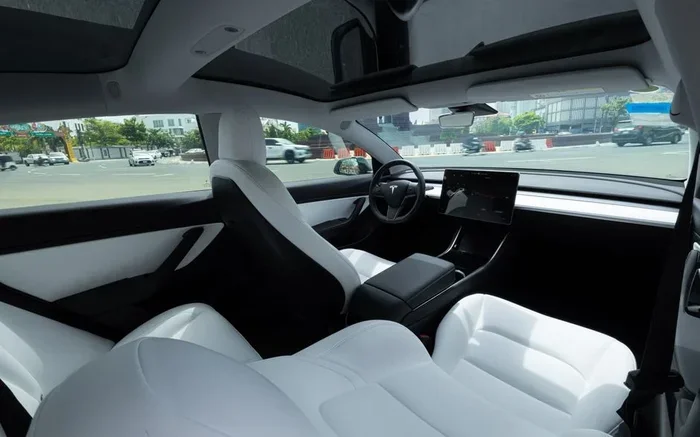
Tesla seats are designed with modern ergonomics in mind. They feature contoured shapes that support your spine and hips naturally. The seat bolsters hold your body in place during turns and sudden stops. Unlike older car designs, Tesla seats often come with ventilated and heated options that add another layer of comfort.
The materials used in Tesla seats are also worth noting. Many models use premium synthetic leather or genuine leather that conforms to your body over time. This means your seat actually adapts to you as you drive. The combination of smart design and quality materials makes Tesla seats stand out in the electric vehicle market.
Why Ergonomics Matter Behind the Wheel
Good ergonomic seating is not a luxury. It is essential for your health and safety. Poor posture while driving can cause back pain, neck strain, and even headaches. Over time, these issues can become chronic and affect your daily life.
When your seat is properly positioned, your body stays relaxed. Your arms and legs maintain a natural bend. Your eyes have a clear view of the road and dashboard. All of this adds up to a safer and more enjoyable driving experience. This is exactly what Tesla seat ergonomics aim to achieve.
Adjusting Your Seat for Optimal Support
Finding the Right Seat Height
Start with seat height. You want your hips to be level with or slightly above your knees. This position gives you better visibility and control. In most Tesla models, you can adjust the seat height using the controls on the side of the seat.
A good rule of thumb is to make sure you can see the top of the dashboard clearly. If you are too low, your view of the road gets blocked. If you are too high, you might feel unsteady. Take a few moments to find the sweet spot that feels both comfortable and secure.
Seat Fore-Aft Positioning
Next, adjust how far forward or backward your seat slides. You want your wrists to rest comfortably on top of the steering wheel when your arms are fully extended. Your knees should have a slight bend when you press the pedals all the way down.
Sitting too close to the steering wheel is a common mistake. It puts pressure on your chest and limits your movement. Sitting too far back can make it hard to reach the pedals and controls. Find a position where you feel relaxed but in full control of the vehicle.
Recline and Backrest Angle
The recline angle of your backrest also matters. A slight recline of about 100 to 110 degrees is often ideal for long drive comfort. This angle reduces pressure on your lumbar spine and helps your shoulders relax.
Avoid reclining too far back. It can make it harder to reach the pedals and can cause you to slouch. At the same time, sitting completely upright for hours can strain your lower back. The goal is a balanced position that supports your natural spine curve.
Lumbar Support and Posture Tips
Adjusting Lumbar Support
Most Tesla models come with adjustable lumbar support. This feature lets you raise or lower the lower back portion of the seat. Proper lumbar support prevents slouching and keeps your spine aligned throughout the drive.
To adjust it, look for the lumbar control on the side of the seat. Start with the support at the level of your belt line. Then adjust up or down until you feel gentle pressure in your lower back. The support should feel firm but not uncomfortable or pushing too hard.
If your Tesla does not have built-in lumbar adjustment, you can use an aftermarket lumbar cushion. These are affordable and easy to install. They can make a big difference in seat comfort during long trips.
Common Posture Mistakes to Avoid
Many drivers develop bad habits without realizing it. Here are a few common posture mistakes to watch out for:
- Slouching forward puts extra strain on your neck and upper back.
- Crossing your legs can restrict blood flow and cause discomfort over time.
- Leaning on one side creates uneven pressure on your spine and hips.
- Driving with rounded shoulders leads to tension in your neck and arms.
- Sitting on your wallet or phone can throw off your alignment.
Make a habit of checking your posture every few minutes. Small corrections add up to big improvements in comfort and driving fatigue reduction.
Seat Heating, Cooling, and Ventilation Features
When to Use Seat Heating
Tesla seat heating is one of the most popular comfort features. It warms your seat and keeps you cozy during cold mornings or winter drives. You can adjust the heat level using the touchscreen or the seat controls on the side.
Seat heating is especially helpful for drivers who suffer from cold-weather stiffness. Warm muscles are more flexible and less prone to strain. If you live in a cold climate, this feature alone can make your daily commute much more pleasant and comfortable.
Seat Cooling for Hot Climates
On the other side, seat cooling is a lifesaver in hot weather. It prevents you from sticking to the seat and helps you stay focused. Seat ventilation works by circulating air through the seat surface, keeping you cool and dry.
In hot climates like Arizona or Texas, seat cooling can feel like a small luxury that makes a big difference. It reduces sweat and discomfort, which means less distraction while driving. If your Tesla model supports it, make sure to take advantage of this feature.
Memory Settings and Customization
Setting Up Your Profiles
One of the best features of Tesla seats is the memory seat settings. You can save your preferred seat position, mirror angles, and even steering wheel height in a profile. This means every driver in your household can hop in and find their perfect position instantly.
To set up a profile, go to the Controls menu on your touchscreen. Select Profiles and then choose the driver profile you want to customize. Adjust your seat, mirrors, and steering wheel, then save the settings. Next time you select that profile, everything adjusts automatically.
Using the Touchscreen Controls
The Tesla touchscreen makes it easy to adjust your seat on the fly. You can access seat controls from the quick settings menu or directly from the seat adjustment screen. The interface is intuitive and lets you make changes in seconds.
You can adjust the seat height, fore-aft position, recline angle, lumbar support, and even the seat cushion tilt. Some models also allow you to adjust the headrest for added comfort. Spend a few minutes exploring these options and find the combination that works best for you.
Common Mistakes and How to Fix Them
Sitting Too Close to the Steering Wheel
Sitting too close to the steering wheel is one of the most common seat mistakes. It restricts your movement, puts pressure on your chest, and can cause arm fatigue on long drives. The recommended distance is about 10 to 12 inches between your chest and the steering wheel center.
If you find yourself sitting too close, check your seat position. Move the seat back slightly and raise it if needed. You should be able to hold the steering wheel with slight bend in your elbows and still reach all the pedals comfortably.
Ignoring Seat Position Over Time
Another mistake is setting your seat once and never adjusting it again. Over time, your body changes, and so do your needs. You might gain or lose weight, develop new back issues, or simply prefer a different position as you get used to driving.
Make it a habit to reassess your seat position every few months. Small tweaks can make a huge difference. Pay attention to how your body feels after a drive and adjust accordingly. This simple habit is one of the best ways to maintain great Tesla seat ergonomics over time.
Rear Seat Ergonomics for Passengers
Tesla seat ergonomics are not just for the driver. Rear passengers deserve comfort too, especially on long road trips. In Model 3 and Model Y, the rear seats are designed with generous legroom and supportive cushions. However, not every rear seat is created equal, and small adjustments can make a big difference.
If you have passengers in the back, encourage them to adjust their seat position. The rear seat cushion angle and headrest can usually be adjusted for better support. For families with children, make sure the seatbelt fits properly across the chest and lap. Comfort in the rear means happier passengers and fewer complaints on long drives.
Quick Tips for Better Tesla Seat Ergonomics
Here are some quick tips you can use right away to improve your Tesla seat comfort:
- Adjust your seat before every drive. Even a one-minute check can prevent discomfort.
- Use both lumbar and recline adjustments together for the best support.
- Take breaks on long trips. Stop every hour or so to stretch and move around.
- Use a seat cushion if the stock seat feels too firm for your preference.
- Keep your steering wheel at the right height so your arms are relaxed.
- Experiment with seat heating and cooling to find the temperature that works best for you.
- Save your ideal position in a memory profile so you never have to start from scratch.
These tips are simple but effective. They require no extra cost and can be implemented immediately. Over time, they become second nature and help you get the most out of every drive.
Expert Insights on Tesla Seat Ergonomics
Automotive ergonomics experts agree that seat position is one of the most important factors in driving comfort and safety. According to ergonomic research, the ideal driving position allows your feet to reach the pedals with full leg extension while keeping a slight bend in your knees. Your back should be fully supported by the seat backrest, and your arms should have a natural reach to the steering wheel.
Experts also recommend paying attention to ambient temperature inside the cabin. Extreme heat or cold can affect how your body responds to the seat. Using seat ventilation and climate control together creates the most comfortable environment for long drives. These small details make a noticeable difference in how refreshed you feel when you arrive at your destination.
Key Takeaways
- Correct seat height and distance give you full control and better visibility on the road.
- Lumbar support adjustment is one of the simplest ways to reduce back pain during long drives.
- Seat heating and cooling features keep you comfortable in all weather conditions.
- Memory seat profiles let multiple drivers save their ideal position in seconds.
- Common mistakes like sitting too close to the wheel can cause fatigue and poor posture.
- Rear seat ergonomics matter too, especially for families and long road trips.
- Regular micro-adjustments throughout a drive help maintain comfort and reduce strain.
Conclusion
Tesla seat ergonomics are a key part of the driving experience that many owners overlook. By taking the time to adjust your seat properly, you can enjoy greater comfort, less fatigue, and better posture on every trip. The features built into Tesla vehicles give you more control than ever over your driving position.
From lumbar support and seat heating to memory profiles and touchscreen controls, Tesla offers tools that make it easy to find your perfect setup. The tips in this guide are simple to follow and deliver real results. Start making small adjustments today, and you will feel the difference on your very next drive. Your body will thank you for it.
Frequently Asked Questions
How do I adjust the lumbar support on my Tesla seat?
You can adjust the lumbar support using the controls on the side of the seat. Simply turn the dial or use the touchscreen menu to raise or lower the lumbar level. Start at your belt line and adjust until you feel gentle, comfortable support in your lower back.
Can I save my seat position in a Tesla?
Yes, Tesla allows you to save your seat position in driver profiles. Go to Controls, then Profiles, and customize your seat, mirror, and steering wheel settings. When you select that profile, everything adjusts automatically for a personalized driving experience.
Why does my back hurt after driving my Tesla?
Back pain after driving is often caused by poor seat position or lack of lumbar support. Check your seat height, recline angle, and distance from the steering wheel. Making small adjustments to your Tesla seat ergonomics can relieve strain and improve comfort significantly.
Does Tesla offer seat cooling in all models?
Seat cooling is available in select Tesla models and trim levels. It is most commonly found in the Model S and Model X. Some Model 3 and Model Y configurations also include this feature. Check your specific model’s specifications to confirm availability.
How often should I adjust my driving seat position?
It is a good idea to reassess your seat position every few months or whenever you feel discomfort. Small changes in your body, driving habits, or preferences may require adjustments. Regular check-ins help you maintain optimal seat ergonomics over time.
Are aftermarket seat cushions worth it for Tesla owners?
Yes, aftermarket seat cushions can be a great addition if the stock seat feels too firm or does not suit your body type. Look for cushions that offer memory foam and lumbar support. They are affordable and can significantly improve long drive comfort.