Tesla Model 3 Driving Position Tips and Setup Guide
Finding the right tesla model 3 driving position can transform every drive from uncomfortable to enjoyable. This guide walks you through seat adjustment, steering wheel setup, mirror alignment, and common mistakes to avoid. You will learn simple steps to customize your cockpit for comfort, visibility, and long-distance driving ease.
Have you ever climbed into a tesla model 3 and felt like the driving position was just slightly off? Maybe the steering wheel was too close, or the seat sat too low. You are not alone. Many drivers discover that the factory settings do not match their body perfectly. The good news is that the Model 3 offers plenty of adjustment options once you know where to start.
Your driving position affects everything from comfort to safety. A poorly aligned seat can cause back pain within minutes. An awkward steering wheel angle leads to shoulder strain on long trips. And incorrect mirror placement creates blind spots that make merging dangerous. This guide covers every aspect of setting up your tesla model 3 driving position the right way. You will walk away with actionable steps you can try today.
We will break things down into simple sections. Each one focuses on a specific part of your cockpit setup. Whether you are a new Model 3 owner or have been driving one for years, there is always room to improve. Let us dive in and make your next drive more comfortable.
Key Takeaways
- Seat position matters most: Correct seat height and distance from pedals reduce fatigue and improve safety.
- Steering wheel placement affects comfort: Adjust tilt and telescoping for a relaxed arm position on every drive.
- Mirror setup boosts visibility: Properly aligned mirrors eliminate blind spots and make lane changes safer.
- Avoid common mistakes: Sitting too close or too far from the wheel causes strain and reduces control.
- Small tweaks make a big difference: Lumbar support, headrest height, and seat cushion angle all play a role.
- Long drives need extra attention: Taking breaks and fine-tuning your position prevents driving fatigue over time.
📑 Table of Contents
- Understanding the Tesla Model 3 Cockpit Layout
- How to Adjust Your Seat for Optimal Comfort
- Steering Wheel Positioning for the Best Drive
- Mirror and Visibility Adjustments
- Common Driving Position Mistakes to Avoid
- Expert Tips for Long-Distance Comfort
- Quick Tips Summary
- Conclusion
- Frequently Asked Questions
Understanding the Tesla Model 3 Cockpit Layout
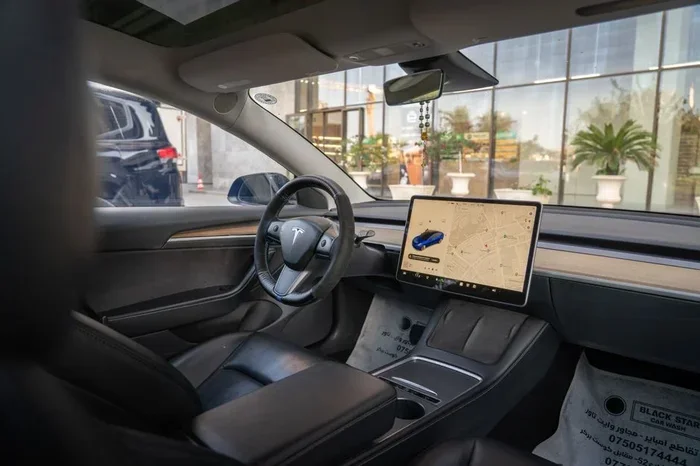
The Model 3 interior is sleek, minimalist, and different from most cars on the road. There is no traditional dashboard cluster in front of you. Instead, a wide center touchscreen dominates the console. This unique layout changes how you think about your driving position and seat placement.
The Center Console and Its Impact
Because the console runs across the entire width of the cabin, your legs have more room than you might expect. The center console does not block your knee space the way a traditional shifter does. This gives you flexibility in how far back you slide the seat. Many drivers find they can sit further back and still reach the pedals comfortably.
However, the wide console also means the steering column sits slightly forward in the cabin. This affects your steering wheel position and how close your chest feels to the wheel. Understanding this layout helps you make smarter adjustments from the start.
Why Cockpit Ergonomics Matter
Ergonomics is the science of designing things to fit the human body. In a car, good ergonomics means less fatigue, better reaction time, and fewer aches. The Model 3 cockpit is well-designed, but every body is different. Your height, arm length, and leg reach all factor into finding your ideal driving posture. Taking five minutes to dial in your setup pays off every single time you drive.
How to Adjust Your Seat for Optimal Comfort
The seat is the foundation of your entire tesla model 3 driving position. Get this right, and everything else falls into place. Get it wrong, and you will feel it on every trip. The Model 3 offers manual seat adjustments on most trims, with power seats available on higher configurations.
Seat Height and Headrest
Start with seat height. You want a position where you can see the road clearly over the hood. Your head should not touch the roof lining. At the same time, you do not want to sit so low that your view of the dashboard visibility is blocked.
The headrest should sit snug against the back of your head. Not your neck, your head. This protects you in a rear-end collision and also reduces neck strain during drives. Adjust the headrest height until it feels natural and supportive.
Seat Forward and Backward Position
Slide the seat forward or backward until you can fully press the brake pedal to the floor with a slight bend in your knee. Your legs should never be completely straight when reaching the pedals. A slight bend keeps your legs relaxed and reduces cramping on longer trips.
A common mistake is sitting too close to the steering wheel. This puts your chest under constant pressure and limits your range of motion. Aim for at least 10 to 12 inches between your chest and the steering wheel hub. This distance also allows the airbag to deploy safely in a collision.
Seat Recline Angle
The recline angle of your seat back affects both comfort and control. A nearly upright position gives you the best feel for the road and better visibility of the instruments. However, too upright can cause lower back tension over time.
A slight recline of about 100 to 110 degrees often works well. This angle supports the natural curve of your spine. You can experiment to find what feels best for your body type. Remember, you should be able to reach the top of the steering wheel easily with your hands when your arms are extended.
Lumbar Support and Seat Cushion
The Model 3 includes adjustable lumbar support on the driver seat. Turn the lumbar dial until you feel firm support in your lower back. If you feel any gap between your lower back and the seat, the support is too low. If you feel pressure, it is too high.
The seat cushion angle also matters. A slight downward tilt on the cushion helps support your thighs and improves blood flow. This is especially helpful on long highway drives where you are seated for extended periods.
Steering Wheel Positioning for the Best Drive
The steering wheel is your primary connection to the road. Getting the steering wheel position right is essential for both comfort and control. The Model 3 uses a yoke-style steering wheel on newer models, which changes how you think about grip and reach.
Tilt and Telescoping Adjustments
The Model 3 steering wheel offers both tilt and telescoping adjustment. Tilt moves the wheel up or down, while telescoping moves it closer or further away. Use both to find your sweet spot.
Your wrists should rest comfortably on top of the wheel when your arms are relaxed. Your shoulders should stay pressed against the seatback. If you find yourself hunching forward to reach the wheel, it is too far away. If your arms are fully extended, it is too close.
Yoke vs. Round Wheel: What Works Best
Tesla’s yoke design is polarizing. Some drivers love the modern look and better visibility of the dashboard visibility it provides. Others find it awkward for tight parking maneuvers and low-speed turns.
If you have a yoke, focus on keeping your hands in the 9 and 3 or 8 and 4 position. This gives you the best control without straining your wrists. For round wheel versions, the traditional 10 and 2 or 9 and 3 positions work well. Experiment with both and see what feels natural for your driving comfort.
Mirror and Visibility Adjustments
Even with a perfect seat and steering setup, poor mirror placement ruins your driving position. Good visibility is one of the most important parts of safe driving. The Model 3 uses traditional side mirrors and a rearview camera instead of a mirror, which changes the setup process slightly.
Side Mirror Positioning
Adjust each side mirror so that you see just a sliver of the car’s side panel on the inside edge. The rest of the mirror should show the lane beside you and behind you. This setup minimizes blind spots and gives you the widest view of surrounding traffic.
Many drivers set their mirrors too wide, showing too much of the road behind them. This creates a gap between what you see in the mirrors and what you see by looking over your shoulder. The goal is to blend the mirror view with your peripheral vision seamlessly.
Rearview Camera and Roof Panel
The Model 3 rearview camera provides a clear view behind you. Make sure the camera lens is clean and free of dirt or snow. The camera activates automatically when you shift into reverse, giving you a helpful view of the space behind the car.
The panoramic glass roof is a great feature, but it can sometimes create glare. Use the visor if needed, and keep the roof clean for the best visibility during your drives. A clean, glare-free cabin makes a huge difference in how relaxed you feel behind the wheel.
Common Driving Position Mistakes to Avoid
Even experienced drivers make setup mistakes. These small errors add up over time and can cause discomfort or even safety issues. Here are the most common ones to watch out for when setting your tesla model 3 driving position.
Sitting Too Close to the Steering Wheel
This is the number one mistake. Sitting too close puts your chest under constant pressure and limits your ability to turn the wheel fully. It also reduces the safe distance for airbag deployment. Always keep a comfortable gap between your chest and the steering wheel hub.
Slouching or Crossing Your Legs
Slouching changes your driving posture and takes your hips out of alignment. Over time, this causes lower back pain and reduces your ability to react quickly. Keep your back firmly against the seatback and both feet flat on the floor or pedals.
Ignoring Mirror Adjustments
Many drivers set their mirrors once and never touch them again. But your mirror position should change if your seat position changes. Always recheck your mirrors after adjusting your seat. A small shift in seat position can create a big blind spot if the mirrors are not updated.
Overlooking Seat Cushion Angle
A flat seat cushion may seem neutral, but it does not support your thighs properly. A slight downward tilt helps distribute your weight evenly and prevents your legs from falling asleep on longer drives. This small tweak can make a surprising difference in your overall driving fatigue levels.
Expert Tips for Long-Distance Comfort
Setting up your tesla model 3 driving position for short trips is one thing. But if you regularly drive long distances, you need a few extra tricks to stay comfortable and alert.
Take Regular Breaks
Even with the perfect seat setup, sitting in one position for hours causes stiffness. Plan to stop every 90 minutes or so. Stand up, stretch your legs, and move your shoulders. This simple habit keeps your blood flowing and reduces the risk of deep vein thrombosis on long road trips.
Use a Seat Cushion for Extra Support
Aftermarket seat cushions can add an extra layer of comfort. Memory foam cushions conform to your body and provide excellent pressure relief. Look for cushions with a coccyx cutout if you experience tailbone discomfort. These are widely available and affordable.
Keep Your Poston Mindful
It is easy to slowly slide forward or slouch during a long drive without noticing. Set a mental reminder to check your posture every 15 to 20 minutes. Pull your shoulders back, keep your feet flat, and make sure your lower back is supported by the lumbar setting.
Adjust Climate for Comfort
This might seem unrelated, but temperature affects how you feel in your seat. A seat that is too warm can make you feel sluggish. A seat that is too cold can cause muscle tension. Use the Tesla climate system to keep the cabin at a comfortable temperature that supports relaxation during your drive.
Quick Tips Summary
- Start with seat height so you have clear road visibility.
- Slide the seat back until you have a slight knee bend when pressing the brake.
- Keep 10 to 12 inches between your chest and the steering wheel.
- Recline the seat back slightly, around 100 to 110 degrees.
- Adjust lumbar support until your lower back feels firm and supported.
- Set side mirrors to show a thin edge of the car’s side panel.
- Keep both feet flat on the floor or pedals at all times.
- Re-check your mirrors every time you change your seat position.
- Take a break every 90 minutes on long drives.
- Experiment with seat cushion tilt for the best thigh support.
Conclusion
Your tesla model 3 driving position is one of the most important things you can fine-tune. It affects your comfort, your safety, and how much you enjoy every drive. The good news is that the Model 3 gives you all the tools you need to get it right. From seat height to steering wheel tilt, from mirror placement to lumbar support, each adjustment plays a role in your overall experience.
Take the time to work through each step in this guide. Do not rush the process. Your body is unique, and what works for one driver might not work for another. Once you find your perfect setup, write it down or take a photo so you can replicate it easily.
Remember, small changes lead to big improvements. A slightly different seat angle or a minor mirror adjustment can turn a 30-minute commute into a comfortable, enjoyable experience. Your tesla model 3 is a remarkable car, and driving it in a well-set-up position is the best way to enjoy everything it has to offer. Start today, and your back, shoulders, and neck will thank you on every drive.
Frequently Asked Questions
What is the best seat position for a tesla model 3 driving position?
The best position starts with your seat height, where you can see over the hood clearly. Then slide the seat back until you have a slight bend in your knee when pressing the brake. Keep your back firmly against the seatback and adjust the lumbar support for lower back comfort. This foundation makes every other adjustment easier and more effective.
How far should you sit from the steering wheel in a Model 3?
Aim for at least 10 to 12 inches between your chest and the steering wheel hub. You should be able to reach the top of the wheel with your arms extended while keeping your shoulders against the seatback. This distance ensures safe airbag deployment and gives you full control without straining your arms or shoulders.
Can you adjust the seat while driving a tesla model 3?
Tesla does not recommend adjusting the seat while the car is in motion. Even small changes can shift your focus and affect your control. Always park the car fully before making seat adjustments. This simple habit keeps you safe and ensures the seat locks into the correct position before you start driving again.
Why does my back hurt after driving a Model 3?
Back pain usually comes from a seat that is too upright, too far forward, or lacking lumbar support. Try reclining the seat slightly, sliding it back, and increasing the lumbar support. If the pain continues, consider a memory foam seat cushion for extra pressure relief. Your driving posture plays a huge role in how your body feels after a trip.
Does the yoke steering wheel affect driving position comfort?
The yoke can feel different from a traditional round wheel, especially at low speeds and during parking. It takes a few drives to get used to. Focus on keeping your hands at the 8 and 4 or 9 and 3 positions. Over time, most drivers find the yoke offers excellent visibility and a modern feel that enhances the overall cockpit experience.
How often should you recheck your driving position setup?
You should recheck your setup any time you change your seat position or if someone else drives your car. It is also a good habit to revisit your adjustments every few months. Our bodies change, and what felt perfect six months ago might need a small tweak. Regular check-ins keep your driving comfort at its best year-round.