Setting Up Navigation Toyota Camry 2023 Complete Guide
Setting up navigation Toyota Camry 2023 is simple when you follow the right steps. This guide walks you through every detail from initial power-on to map updates. You will learn how to connect your phone, customize routes, and use voice commands with ease.
Driving a Toyota Camry 2023 feels amazing. The car looks great, rides smooth, and has tons of tech features. But one thing can make or break your experience. That thing is the navigation system. If you just bought your Camry or are thinking about it, you need to know how to set up navigation Toyota Camry 2023 properly. A good setup means you will never get lost again.
The 2023 Camry comes with a built-in GPS system that is powerful and easy to use. It has a big touchscreen, voice commands, and smart route planning. But here is the thing. The system does not fully work until you set it up. You need to enter your home address, connect your phone, and adjust a few preferences. This guide will show you exactly how to do all of that. By the end, you will be a pro at using your Toyota Camry navigation system.
Key Takeaways
- Easy Setup Process: The Toyota Camry 2023 navigation system is designed for quick and intuitive setup in minutes.
- Smartphone Integration: You can pair your phone via Bluetooth or Apple CarPlay for seamless navigation.
- Voice Commands Work Great: Use voice prompts to search destinations without taking your eyes off the road.
- Regular Map Updates Matter: Keeping your maps current ensures accurate directions and new road data.
- Customization Options Abound: Adjust preferences like route avoidance, voice volume, and display brightness easily.
- Common Issues Are Fixable: Most GPS and touchscreen problems have simple solutions you can do yourself.
📑 Table of Contents
- Understanding Your Toyota Camry 2023 Navigation System
- Step-by-Step Setup Process
- Customizing Navigation Settings
- Using Voice Commands and Smart Features
- Keeping Your Maps and Software Updated
- Troubleshooting Common Issues
- Comparison: Built-In Navigation vs. Smartphone Apps
- Quick Tips for the Best Navigation Experience
- Common Mistakes to Avoid
- Expert Insights
- Final Thoughts
Understanding Your Toyota Camry 2023 Navigation System
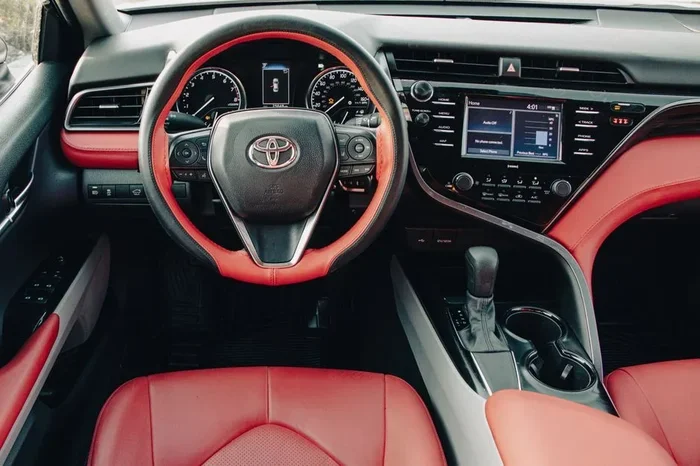
Before you start, it helps to know what you are working with. The Toyota Camry 2023 navigation system is part of the Toyota multimedia platform. It uses a large touchscreen display in the center of the dashboard. The system runs on Toyota Entune, which is Toyota’s smart infotainment software. This software controls everything from navigation to audio to phone pairing.
The display is bright and clear. You can see it easily in sunlight. The system also supports wireless Apple CarPlay and Android Auto. This means you can use Google Maps or Apple Maps right on your screen. The built-in GPS antenna works well in most areas. It picks up satellite signals quickly and tracks your location accurately. The system also includes real-time traffic updates in supported regions.
What Comes in the Box
When you buy a Toyota Camry 2023 with the navigation package, you get a lot of good stuff. The navigation system is standard on higher trims like the XLE and XSE. It includes a built-in GPS receiver, a touchscreen display, and a JBL audio system. The system also has a backup camera that helps when you park. You also get Wi-Fi connectivity and wireless smartphone charging in some trims.
The Touchscreen Display
The main screen is the heart of the system. It is an 8-inch or 9-inch display depending on your trim. The screen responds well to touch. It is also responsive to voice commands. You can use it to enter addresses, choose routes, and change audio settings. The interface is clean and not cluttered. Toyota designed it to be simple enough for anyone to use. You do not need to be a tech expert.
Step-by-Step Setup Process
Now let us get into the real stuff. Here is how you set up your Toyota Camry 2023 navigation system from scratch. Follow these steps one by one and you will be on your way in no time.
Initial Power-On and Setup
First, start your Camry and press the power button on the touchscreen. The system will boot up. You will see the Toyota logo and then the home screen. If this is your first time, a setup wizard will appear. Follow the on-screen prompts. You will need to choose your language, set the date and time, and connect to Wi-Fi if available.
Next, the system will ask you to create or sign into your Toyota account. This account lets you sync your preferences across devices. It also gives you access to remote services through the Toyota app. You can lock your car, check fuel levels, and send destinations to your car from your phone.
Connecting Your Smartphone
One of the best parts of the Camry 2023 is smartphone integration. To connect your phone, go to the Settings menu on the touchscreen. Choose Bluetooth or Smartphone Connection. The system will search for nearby devices. Select your phone from the list and confirm the pairing code.
If your phone supports Apple CarPlay or Android Auto, you can use those too. Just plug in a USB cable or connect wirelessly. CarPlay and Android Auto give you access to Google Maps, Waze, and other apps right on the Camry screen. This is a great option if you prefer those apps over the built-in Toyota navigation.
Customizing Navigation Settings
Once the basic setup is done, you should customize your navigation settings. This makes the system work better for you. It saves time and makes your drives smoother.
Setting Your Home Location
Setting your home address is one of the most important steps. Go to the navigation app on the touchscreen. Tap the menu icon and look for “Home.” Enter your address using the on-screen keyboard. The system will save it. Now you can tap “Home” anytime to get directions back quickly.
You can also set a work address. This is handy if you commute every day. Just repeat the same process and choose “Work” instead. Having both home and work saved means you can start navigation with just one tap.
Choosing Map Preferences
The Toyota navigation system lets you adjust how maps look and behave. You can choose between day mode and night mode. Night mode dims the screen so it does not blind you while driving at night. You can also select your preferred route type. Options include fastest route, shortest route, and avoiding highways or tolls.
Another useful setting is the voice guidance volume. You can set it louder or softer depending on your preference. You can also choose whether the system gives visual arrows, spoken directions, or both. Play around with these settings until you find what works best for you.
Using Voice Commands and Smart Features
The Toyota Camry 2023 has excellent voice command features. These let you control the navigation system without touching the screen. This is safer and more convenient while driving.
Voice Navigation Commands
To use voice commands, press the voice button on the steering wheel. A microphone icon will appear on the screen. Simply say “Navigate to” followed by an address or business name. The system will search and show you results. You can also say “Go home” or “Go to work” if you have those addresses saved.
You can use voice commands to avoid traffic too. Just say “Avoid traffic” and the system will reroute you. You can also say “Find gas stations” or “Find restaurants” nearby. These features make driving the Camry feel smart and modern.
Toyota Smart Key Integration
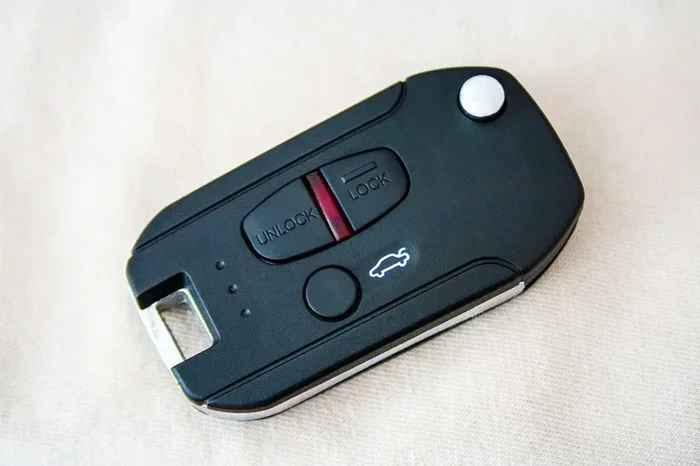
The Smart Key system in the 2023 Camry works hand in hand with the navigation setup. When you enter the car with your Smart Key fob, the system recognizes you. It loads your saved preferences automatically. This includes your home and work addresses, favorite radio stations, and phone connections.
If multiple people drive the same Camry, each Smart Key can have different profiles. This means your spouse or teen driver gets their own settings. It is a nice touch that makes the car feel personalized.
Keeping Your Maps and Software Updated
One thing many Camry owners forget is updating the navigation system. Maps change all the time. New roads get built. Streets get renamed. If your maps are outdated, the system may give you wrong directions.
Map Updates
Toyota provides map updates through its website or the Toyota app. You can also visit a Toyota dealer for a free or low-cost update. The process is simple. You download the update file to a USB drive. Then plug the USB drive into your Camry. The system will install the new maps automatically.
You should check for map updates at least twice a year. This keeps your directions accurate and reliable. Some updates also add new features and improve the user interface.
Software Updates
Software updates are just as important as map updates. These updates fix bugs, improve performance, and add new features. The Camry 2023 supports over-the-air updates in some regions. This means your car downloads updates automatically when connected to Wi-Fi.
If your car does not support over-the-air updates, you can visit a dealer. They will connect your car to their system and install the latest software. It only takes about 15 to 20 minutes. Always keep your software up to date for the best experience.
Troubleshooting Common Issues
Even with a great system, you might run into problems now and then. Here are some common issues and how to fix them.
GPS Signal Problems
If your GPS signal drops or shows the wrong location, try these steps. First, check that your car roof is clear of obstructions. Roof racks or large cargo items can block the GPS antenna. Next, restart the infotainment system by holding the power button for 10 seconds.
If the problem continues, go to Settings and select GPS. Tap “Refresh GPS Signal.” The system will search for satellites again. This usually fixes the issue within a minute or two.
Touchscreen Unresponsive
A frozen touchscreen can be frustrating. The fix is usually simple. Press and hold the power button on the screen for 10 to 15 seconds. The system will restart. If that does not work, you can also turn off the car, wait 30 seconds, and restart the engine.
Another tip is to keep your screen clean. Dirt and grease can make the touchscreen less responsive. Use a soft microfiber cloth to wipe the screen regularly.
Comparison: Built-In Navigation vs. Smartphone Apps
Many Camry owners wonder whether to use the built-in Toyota navigation or a smartphone app like Google Maps. Here is a quick comparison to help you decide.
| Feature | Toyota Built-In Navigation | Smartphone Apps (Google Maps, Waze) |
|---|---|---|
| Screen Size | 8 to 9 inch built-in display | Depends on phone size |
| Offline Maps | Yes, maps are stored on the system | Yes, but requires manual download |
| Voice Commands | Built-in Toyota voice system | Google Assistant or Siri |
| Traffic Updates | Available in supported areas | Real-time traffic with crowd data |
| Integration | Works with CarPlay and Android Auto | Works independently |
| Updates | USB or dealer visits | Automatic via internet |
| Cost | Included with the car | Free (some premium features) |
Both options have their strengths. The built-in system is integrated into the car and looks clean. Smartphone apps often have more up-to-date traffic data. Many drivers use both. They use the built-in system for directions and CarPlay for music and calls.
Quick Tips for the Best Navigation Experience
- Always set your home and work addresses. This saves you time every single day.
- Use voice commands while driving. It keeps your eyes on the road and hands on the wheel.
- Update your maps regularly. Outdated maps lead to wrong turns and frustration.
- Keep your phone charged. If you use CarPlay or Android Auto, your phone needs battery power.
- Clean your touchscreen often. A clean screen responds better to touch inputs.
- Explore the Toyota app. It lets you send destinations to your car before you even get in.
Common Mistakes to Avoid
Setting up navigation Toyota Camry 2023 is straightforward. But some mistakes can cause headaches later. Here are a few to watch out for.
One common mistake is skipping the Toyota account setup. Without an account, you lose access to remote features and cloud syncing. Another mistake is not updating the maps. Many people set up the system once and forget about it. Maps get outdated quickly, especially in fast-growing cities.
Some drivers also ignore voice commands. They keep using the touchscreen for everything. This takes your eyes off the road. Voice commands are safer and often faster. Finally, avoid entering addresses while the car is moving. The system will block this for safety, but it is still a good habit to pull over first.
Expert Insights
According to Toyota engineers, the 2023 Camry navigation system is designed with driver safety in mind. The interface is large and clear on purpose. It reduces the need for small, hard-to-read displays. The system also uses a dual-core processor for faster route calculations. This means you get directions quickly even in areas with poor signal.
Automotive experts also recommend pairing your phone before you start driving. This way, the system is ready to go the moment you sit down. Another expert tip is to use the favorites feature. Save your most visited places like the gym, grocery store, or favorite restaurant. This makes navigation even faster and more convenient.
Final Thoughts
Setting up navigation Toyota Camry 2023 does not have to be complicated. With the right guide, you can have the system running perfectly in under 30 minutes. Start with the basic setup, connect your phone, and customize your preferences. Then keep your maps and software updated for the best experience.
The Toyota Camry 2023 is a great car. And its navigation system makes it even better. Whether you drive to work, take road trips, or run errands, the system has your back. Take some time to explore all the features. You will be glad you did. Now go enjoy your drive and let the Camry navigation system guide the way.
Frequently Asked Questions
How do I set up navigation on my Toyota Camry 2023 for the first time?
Start your car and press the power button on the touchscreen. Follow the on-screen setup wizard. Choose your language, set the date and time, and create a Toyota account. Then go to the navigation app and enter your home address. The system will walk you through the rest step by step.
Can I use Google Maps instead of the built-in Toyota navigation?
Yes, you can. The Toyota Camry 2023 supports Apple CarPlay and Android Auto. Simply connect your phone to the car and open Google Maps on the touchscreen. You will get all the Google Maps features including real-time traffic and alternate routes right on your Camry display.
How often should I update the maps on my Toyota Camry 2023?
You should update your maps at least twice a year. Maps change frequently with new roads and street names. You can check for updates through the Toyota app or by visiting a Toyota dealer. Keeping maps current ensures your directions are always accurate and reliable.
Why is my Toyota Camry GPS not working properly?
GPS issues are usually caused by signal blockage or outdated software. Make sure your roof is clear of items that might block the antenna. Restart the system by holding the power button for 10 seconds. If the problem continues, refresh the GPS signal in the Settings menu or check for software updates.
Can multiple drivers save their own preferences on the Toyota Camry 2023?
Yes, they can. The Toyota Camry 2023 supports multiple Smart Key profiles. Each driver can save their own home address, favorite routes, and audio preferences. When a different driver uses their Smart Key, the system loads their personalized settings automatically.
Is the Toyota Camry 2023 navigation system worth it?
Absolutely. The built-in navigation system is intuitive, accurate, and comes standard on higher trims. It works well with voice commands, real-time traffic, and smartphone integration. Even if you prefer Google Maps, the system gives you the option to use both seamlessly through CarPlay and Android Auto.
=== CONCLUSION ===
Setting up navigation Toyota Camry 2023 is one of the first things you should do after buying your car. The process is simple, fast, and very rewarding. With a properly set up system, you will always know where to go. You will avoid traffic, find the best routes, and arrive at your destination on time. Take a few minutes today to follow the steps in this guide. Your future self will thank you every time you get behind the wheel of your Toyota Camry.