Fix kia rio entertainment glitches with These Simple Tips
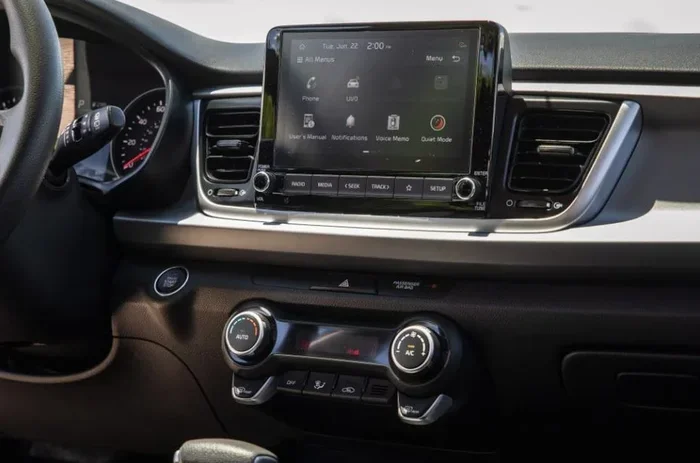
Kia Rio entertainment glitches can ruin your driving experience, from frozen screens to audio cutouts. This guide walks you through proven fixes for common problems like touchscreen lag, Bluetooth pairing failures, and software freezes. Follow these simple steps to troubleshoot and resolve Kia Rio entertainment glitches without visiting a dealer.
Dealing with Kia Rio entertainment glitches is frustrating. Your screen freezes mid-song. The Bluetooth drops during a call. Or the touchscreen stops responding entirely. These problems happen to Kia Rio owners more often than you might think.
The good news? Most fixes are simple and take just a few minutes. You do not need expensive tools or a trip to the dealership. This guide covers every common Kia Rio infotainment problem and gives you clear steps to fix them.
Whether your Kia Rio touchscreen is lagging, your audio keeps cutting out, or the screen just won’t cooperate, we have you covered. Let us dive into the solutions that actually work.
Key Takeaways
- Soft resets fix most minor glitches: A simple restart clears temporary bugs in the Kia Rio entertainment system.
- Software updates prevent recurring issues: Keeping your infotainment firmware current eliminates many known problems.
- Bluetooth and USB connections cause common disruptions: Proper pairing and cable checks solve most connectivity glitches.
- Factory reset is a last resort: Only use a full reset when other methods fail, and always back up your data first.
- Widget flashing and screen freeze are separate issues: Each has its own targeted fix that is quick and easy.
- Professional help is rarely needed: Most Kia Rio entertainment glitches can be resolved at home with basic steps.
📑 Table of Contents
- Why Does My Kia Rio Entertainment System Glitch?
- How to Fix Kia Rio Entertainment Glitches with a Soft Reset
- Update Your Kia Rio Infotainment Software
- Fix Bluetooth and Connectivity Issues
- When to Perform a Factory Reset on Your Kia Rio
- Prevent Future Kia Rio Entertainment Glitches
- Common Mistakes to Avoid When Fixing Kia Rio Glitches
- When to Seek Professional Help
- Final Thoughts
Why Does My Kia Rio Entertainment System Glitch?
Understanding the root cause helps you pick the right fix. Kia Rio entertainment glitches usually come from a few common sources. Software bugs are the number one culprit. The infotainment system runs on a small computer, and like any computer, it can have temporary errors.
Outdated software is another big reason. Kia releases firmware updates that fix known bugs. If your system is not updated, you may run into problems that others already solved. A simple Kia Rio infotainment reset often clears these errors, but you need to address the root cause too.
Hardware issues play a smaller role but still matter. Loose connections, worn-out USB ports, or a failing head unit can cause ongoing problems. Heat exposure inside the car can also affect the touchscreen and internal components over time.
Common Triggers for Kia Rio Entertainment Glitches
- Firmware bugs: Software errors that cause freezing or lag.
- Bluetooth interference: Other devices or signal issues disrupt pairing.
- USB connection problems: Faulty cables or dirty ports stop media playback.
- Memory overload: Too much stored data slows down the system.
- Power surges: Jump-starting or battery issues can reset or damage the unit.
How to Fix Kia Rio Entertainment Glitches with a Soft Reset
A soft reset is the fastest way to solve Kia Rio entertainment glitches. It clears temporary memory and restarts the system without deleting your settings. Think of it like restarting your phone when it acts up.
Here is how to do it. Turn off your Kia Rio and remove the key from the ignition. Wait at least 30 seconds. This lets the system fully power down. Reinsert the key and start the car. The infotainment screen should reboot within 10 to 15 seconds.
If the screen is completely frozen and you cannot turn the car off, press and hold the power button on the head unit for 10 seconds. The system will force restart. This works for most Kia Rio touchscreen not responding situations.
After the reboot, check if your Kia Rio audio system troubleshooting needs continue. Play a song, connect Bluetooth, and try the touchscreen. If the glitch is gone, you are all set. If not, move to the next step.
Quick Tip: Make it a habit to soft reset your Kia Rio once a month. This prevents small bugs from building up into bigger problems.
Update Your Kia Rio Infotainment Software
Outdated software causes many Kia Rio entertainment system fix situations. Kia releases updates that patch bugs and improve performance. If your system is running old firmware, updating it can solve glitches you did not even know were caused by software.
Check for updates by going to Settings on your infotainment screen. Look for System or About. Find the Software Update option. If an update is available, follow the on-screen prompts. Make sure your car is parked and the engine is running during the update.
Some owners prefer to visit a Kia dealer for updates. The dealer has the latest firmware and can install it quickly. But you can also check the Kia Rio infotainment software update process yourself. It is free and only takes a few minutes.
Keep in mind that some older Kia Rio models may not support over-the-air updates. In those cases, a dealer visit or a USB update might be necessary. Check your owner manual for specific instructions.
How Often Should You Update?
Check for updates every three months. Set a reminder on your phone. Regular updates keep your Kia Rio media player error problems to a minimum. They also improve overall system speed and stability.
Fix Bluetooth and Connectivity Issues
Bluetooth problems are among the most common Kia Rio entertainment glitches. Your phone disconnects randomly. Audio skips during calls. The pairing screen freezes. These issues are annoying but usually easy to fix.
Start by turning Bluetooth off on both your phone and the car system. Wait 10 seconds. Turn it back on on your phone first, then on the car. This fresh connection often solves the problem immediately.
If that does not work, delete the Kia Rio from your phone’s Bluetooth memory. Then delete your phone from the car’s Bluetooth list. Pair them again from scratch. This clears any corrupted pairing data that causes Kia Rio Bluetooth issues.
Also check how many devices are connected. Too many paired devices can slow down the system. Keep only the devices you use regularly. Remove old or unused connections from both your phone and the car.
USB Connection Problems
If your USB media is not playing, try a different cable. Damaged cables are a hidden cause of many Kia Rio entertainment glitches. Use the original cable that came with your phone or a high-quality replacement.
Clean the USB port with compressed air. Dust and lint build up inside the port over time. This can cause intermittent connection problems. A quick clean often restores full functionality.
When to Perform a Factory Reset on Your Kia Rio
A factory reset should be your last resort. It wipes all settings, paired devices, and saved data from the infotainment system. But when nothing else works, it can fix deep-rooted Kia Rio infotainment reset problems.
Before you reset, write down your Bluetooth pairing codes and any important settings. The reset will erase everything. After the reset, you will need to set up the system again from scratch.
To perform a factory reset, go to Settings. Find System or General. Look for Factory Reset or Master Reset. Confirm the action and wait for the system to restart. The process takes about 5 minutes.
After the reset, update your software first before reconnecting devices. This ensures you start fresh with the latest firmware. Most owners report that a factory reset followed by an update solves even the most stubborn Kia Rio entertainment glitches.
Expert Insight: If you find yourself needing frequent factory resets, there may be an underlying hardware issue. Consider visiting a Kia service center for a professional diagnosis.
Prevent Future Kia Rio Entertainment Glitches
Prevention is always better than fixing. A few simple habits keep your Kia Rio infotainment system running smoothly for years.
First, restart your system regularly. A monthly soft reset clears out temporary files and prevents memory buildup. Second, keep your software updated. Those update notifications are not just annoying popups. They fix real bugs that cause Kia Rio screen flickering and other issues.
Third, use quality cables and accessories. Cheap USB cables and uncertified adapters can introduce signal problems. Stick with trusted brands and original equipment when possible.
Fourth, manage your stored data. Delete old playlists, unused apps, and cached files regularly. A full storage drive slows down the system and causes errors. Keep at least 20 percent of your storage free.
Finally, protect your car from extreme heat. Park in shade when possible. High temperatures affect electronic components and can worsen existing Kia Rio audio system troubleshooting needs.
Common Mistakes to Avoid When Fixing Kia Rio Glitches
Many owners make mistakes that make Kia Rio entertainment glitches worse. Avoid these common pitfalls.
Do not force reboot too often. Repeated hard resets can stress the system. Try a soft reset first. Only use a force restart when the screen is completely frozen.
Do not ignore update notifications. Postponing updates leaves known bugs in your system. Install updates as soon as they are available.
Do not use low-quality USB cables. They cause connection drops and can even damage the USB port over time. Invest in a good cable.
Do not skip backing up before a factory reset. Losing your paired devices and settings is frustrating. A quick backup saves you time and hassle.
When to Seek Professional Help
Most Kia Rio entertainment glitches resolve with the steps above. But some problems need a professional touch. If your screen has physical damage, if the system keeps crashing after a full reset, or if you notice a burning smell from the head unit, see a Kia technician right away.
These could be signs of a deeper hardware failure. A professional can diagnose the issue with specialized tools. In some cases, a head unit replacement may be necessary. But this is rare and usually covered under warranty if your car is still within the coverage period.
Check your warranty before paying for repairs. Kia offers a solid warranty on its infotainment systems. You might get the fix for free.
Final Thoughts
Kia Rio entertainment glitches are frustrating but rarely permanent. A soft reset, software update, or factory reset can fix most problems in minutes. The key is to act quickly when issues appear and not ignore them.
Keep your system updated, use quality accessories, and restart regularly. These simple habits prevent most glitches from ever happening. And when they do happen, you now have the tools to fix them yourself.
If you are still struggling with Kia Rio touchscreen calibration or persistent audio problems, do not hesitate to reach out to a Kia service professional. They have the expertise and tools to handle even the trickiest issues. Your Kia Rio deserves a smooth, glitch-free entertainment experience. Use these tips to get it back on track today.
Frequently Asked Questions
Why does my Kia Rio entertainment system keep freezing?
Freezing usually happens because of outdated software or memory overload. Try a soft reset first and check for any available Kia Rio infotainment software update. If the problem continues, a factory reset often resolves deep software conflicts that cause repeated freezing.
How do I reset the Kia Rio infotainment system?
You can perform a soft reset by turning off the car, waiting 30 seconds, and restarting. For a full reset, go to Settings, select System, and choose Factory Reset. Always back up your paired devices before doing a factory reset so you do not lose your settings.
Can I fix Kia Rio Bluetooth glitches at home?
Yes, most Bluetooth issues are easy to fix at home. Turn Bluetooth off and back on, delete and re-pair your devices, and make sure your phone software is current. These simple steps resolve the majority of Kia Rio Bluetooth issues without any professional help.
Why is my Kia Rio touchscreen not responding?
A non-responsive touchscreen is often caused by a temporary software error or a frozen process. Perform a soft reset by holding the power button for 10 seconds. If the screen still does not respond, check for software updates or try a factory reset as a last resort.
How often should I update my Kia Rio entertainment software?
Check for updates every three months. Regular updates fix bugs, improve performance, and prevent many common Kia Rio entertainment glitches. If your model does not support over-the-air updates, visit a Kia dealer for the latest firmware.
Is a factory reset safe for my Kia Rio entertainment system?
Yes, a factory reset is safe but it erases all your settings and paired devices. Make sure to note down important information before resetting. After the reset, update your software first and then reconnect your devices for the best results.